6-Step Checklist for Building an AI Chatbot: How to Get 200% Out of Your Scattered Company Data
"I'm sure we had a similar proposal somewhere… where is it?"
Don't you often have your workflow interrupted while searching for the information you need? Searching, asking, searching again…
You can now solve unproductive information hunting with a single AI chatbot—and it doesn't just answer simple questions.
One consulting firm enabled its internal report writing to search internal data alongside the latest web dataat once. Another manufacturer combined an AI chatbot with its existing ERP system, which previously handled things manually, so that PDFs, documents, and more could be searched across various documents in an integrated way.
Including these cases, we'll cover the following.
5 industry-specific cases of effectively using an internal AI chatbot
The 6-step checklist you need to build your company's AI chatbot
3 key points you can't miss to use it successfully
1. What is an AI chatbot, and what is an internal AI chatbot?
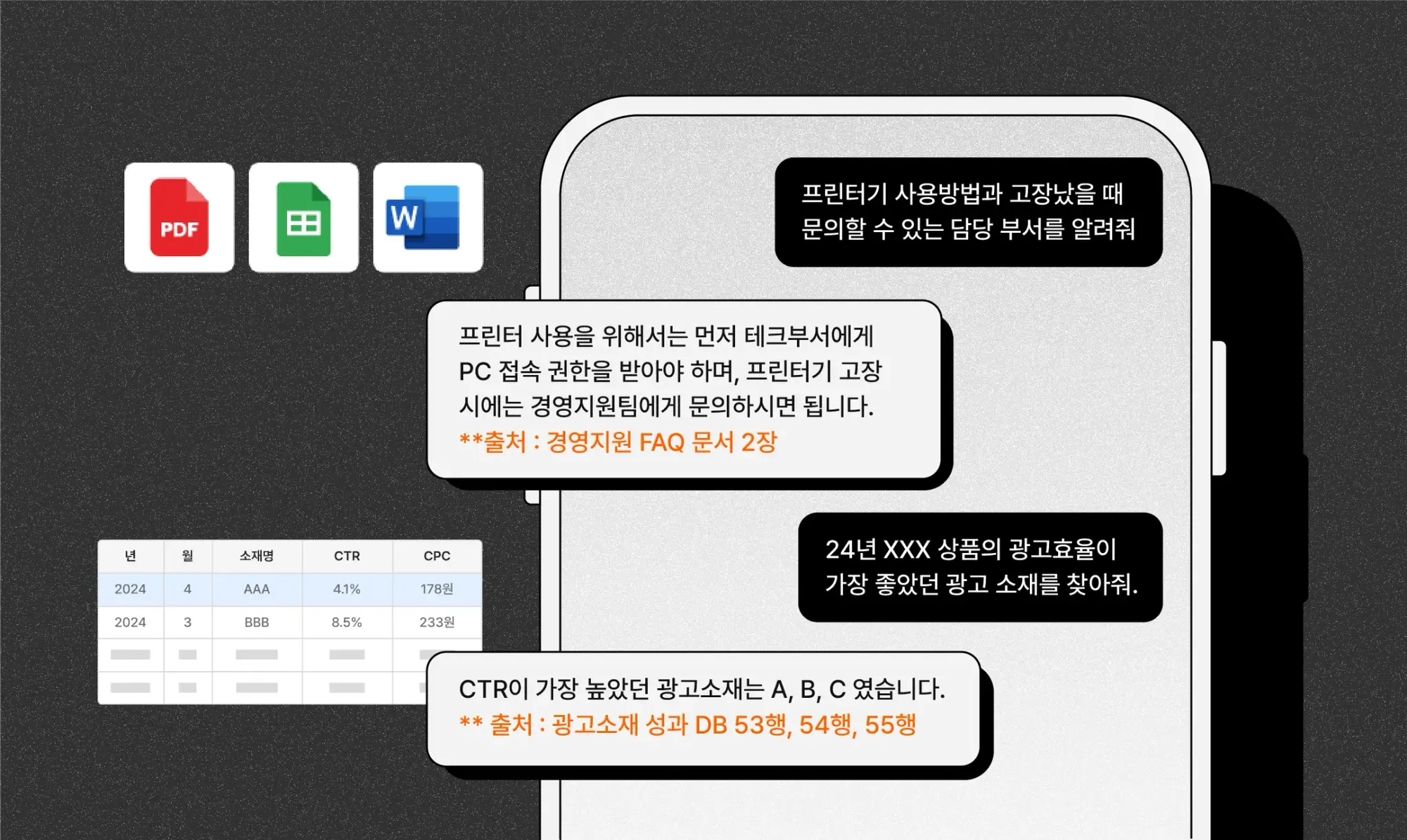
An AI (artificial intelligence) chatbot is a chatbot that can converse like a human. ChatGPTis a representative example of an AI chatbot. What sets it apart is its ability to understand and respond to words just like talking with a friend. It can understand the context and intent of a conversation just like a real person. For more details, please check the blog post below.

"Internal AI chatbot" is a term for an AI chatbot that learns a company's internal data and answers employees' questions in real time. It can quickly find, analyze, and even provide appropriate suggestions for the information you need in your actual work.
Fast and accurate information search: Search for "performance report template" and it shares the most frequently used report format recently, along with real examples of completed reports.
Up-to-date information: Search "new-employee training materials" and it organizes and shares the latest onboarding documents in order of most recently updated.
Policy and guide search: Ask about "remote work" and it extracts and shows the relevant rules from your company's policies.
Like this, an internal AI chatbot goes beyond simple FAQ functions to provide information you can apply directly to your work, helping employees work more efficiently.
2. Why should you build an AI chatbot? 3 benefits
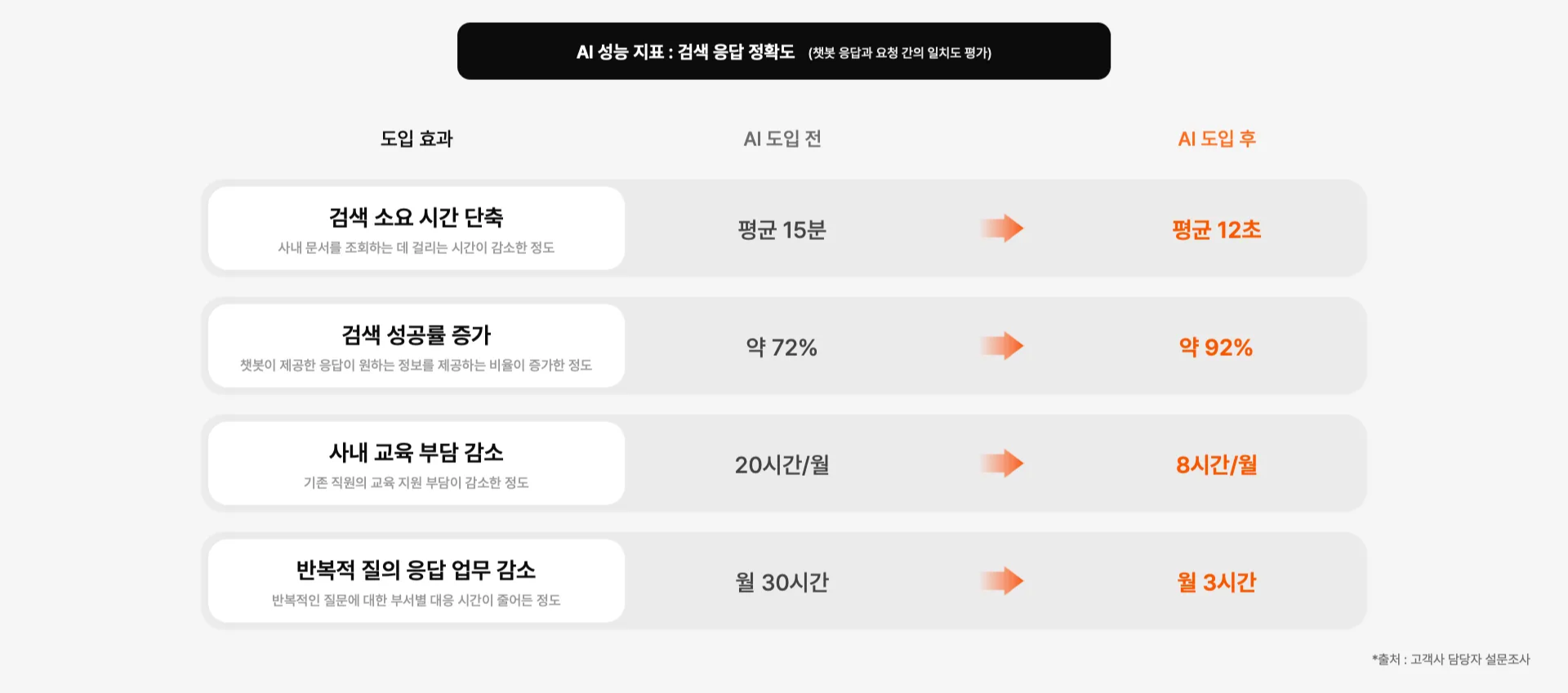
✅ Less unnecessary search time
"I'm sure we had a similar proposal somewhere… where is it?"
You search folders, dig through the groupware, and finally ask a colleague. Time gets wasted in this process, and often people give up because they can't find the document they want.
With an internal AI chatbot, employees can get the most relevant documents recommendedsimply by entering a keyword. The chances of finding the information you want go way up.
✅ Automate repetitive tasks
"Where do I request annual leave?" "Tell me how to connect to the company VPN!"
Inquiries that repeatedly land in departments like HR and IT create inefficiency.
Through an internal AI chatbot, employees can get instant answers and automate the processes they need.
✅ Accumulate company knowledge instead of letting it scatter
"Where's this year's marketing trend report?" "Do we have last year's analysis of customer churn causes?"
Everyone knows managing information is important. But it's not easy for everyone to manage it together. That's why important information ends up scattered at many companies.
An internal AI chatbot can continuously learn internal data and become a warehouse that systematically accumulates company knowledge.
3. The 6-step checklist for building an AI chatbot
Step 1 – Analyze the current state and define the core problem
You need to clearly define the core problem that needs solving in your current work. To do this, analyze inefficient tasks and set improvement goals.
Checklist
What are the TOP 3 inquiries that recur repeatedly?
How much time does information search and response take on average?
What work improvements do you expect from adopting AI?
Do you have metrics to measure goal achievement?
Example
TOP 3 recurring inquiries: whether annual leave is available, how to reset a password, whether health checkups are supported
Average response time: HR team 4 hours/day, IT team 3 hours/day
Expected effect: 70% reduction in time spent handling simple inquiries, information search time cut from 15 minutes → 1 minute
Metrics: number of inquiries per department, time taken to respond, employee satisfaction score
Step 2 – Collect and refine data
This is the step of systematically collecting and organizing the data needed to solve the core problem defined in Step 1. You must structure the data in a form suitable for AI to learn from.
Checklist
What are the TOP 3 documents needed to solve the core problem?
In what format (Word, PDF, etc.) are the documents stored?
When was each document last updated?
Did you check whether documents contain sensitive information?
Example
TOP 3 documents for solving the core problem: HR regulations, internal system manual, benefits guide
Document storage formats: groupware (PDF), shared drive (Word/Excel), messenger (text)
Latest updates: HR regulations (2024.01), system manual (2024.02), benefits guide (2023.12)
Sensitive information: documents containing personal data have been separately classified
Step 3 – Design AI chatbot features
Based on the data collected in Step 2, this is the step of designing the AI chatbot's features to reflect the core problem you actually need to solve.
Checklist
How will you verify the accuracy of answers?
Do you have a response plan for when an answer can't be provided?
Have you set up a way to collect user feedback?
Example
Answer verification method: attach links to related documents, show sources, include a reviewer process
Plan for unanswerable cases: recommend similar questions, connect to a contact person, provide a feedback collection feature
Feedback method: star-rating feature, wrong-answer reporting feature, system for receiving improvement suggestions
Step 4 – Test and improve
Test the designed chatbot with a small group and continuously improve it based on feedback.
Checklist
Are the test group and duration appropriate?
Have the major errors and improvements been identified?
Has enough user feedback been collected?
Example
Test group and duration: 2-week test with 50 people from the HR and IT teams
Major errors and improvements: inaccurate search, slow response speed, complex menu structure
User feedback: satisfaction of 3.8/5, with many comments saying "a more intuitive interface is needed"
Step 5 – Roll out and stabilize
This is the step of rolling out the chatbot reflecting the test results and building a system for stable operation.
Checklist
Have you established procedures for operation and maintenance?
Have you provided user training and a guide?
Have you set up a feedback collection system for continuous improvement?
Example
Operation and maintenance procedures: regular data updates, response process for when failures occur
User training content: basic usage, how to respond by question type, how to provide feedback
Feedback collection system: monthly satisfaction surveys, analysis of wrong-answer cases, reflecting findings in regular updates
Step 6 – Measure impact and improve continuously
This is the step of analyzing performance after rolling out the chatbot and continuously deriving directions for improvement.
Checklist
Did you achieve the quantitative/qualitative goals set at the start?
Have you prepared an improvement plan that reflects user feedback?
Do you have a concrete roadmap for advancing to the next stage?
Example
Goal achievement: 70% reduction in simple inquiries, 90% reduction in information search time
Improvement plan: enhance the AI engine, develop additional features, expand the scope of application
Direction for growth: integrate with other systems, review building a mobile service
4. 3 key points for operating an AI chatbot
To properly leverage an internal AI chatbot, ongoing operation and management are essential. In particular, the issues found in Step 4 (test and improve) are likely to occur in the real operating environment too. Here are 3 tips for operating an internal chatbot.
✅ Prevent hallucinations (providing incorrect information)
An AI chatbot may generate unexpected errors or inaccurate information. This issue was likely discovered in Step 4 (test and improve) and must be continuously monitored during operation too. To prevent it, you can use the following safeguards.
Show sources: display links to related documents or sources clearly alongside the chatbot's answers to boost trust
Additional review feature: let users rate the AI's answers and, when needed, contact the responsible department directly, preventing incorrect information from spreading
✅ Build a data update pipeline
Company policies, HR systems, work processes, and more change continuously. Because the key data set in Step 5 (roll out and stabilize) can change over time, it's important to keep the chatbot always providing the latest information.
Automatic update system: designed so that when a document changes, the chatbot's data is updated automatically too
Assign a manager: appoint someone to regularly review whether the information the chatbot provides is accurate, ensuring operational stability
✅ User training and guidance
If employees don't use it properly, it's hard to achieve real impact. Guidance and training are needed so that employees can properly use the key features introduced in Step 5 (roll out and stabilize).
Provide a usage guide: clearly explain what data the chatbot has learned, and which questions are possible and which are not
Provide examples: compile and share representative examples of questions you can ask
5. 5 industry-specific use cases for AI chatbots
These are cases where companies across various industries used an internal AI chatbot to boost work efficiency.
1) Duty-free shop: Information search trained on specialized terms and work processes


Purpose of adoption
Various information needed to run a duty-free shop—such as glossaries of specialized terms, store operation status, and division of responsibilities—was scattered across multiple documents, making it hard to find what was needed. In particular, to help new employees adapt and existing employees work efficiently, they needed integrated information search.
AI chatbot features
Building duty-free-specific data
Databasing internal documents such as duty-free glossaries, store operation status, and division of responsibilities
Systematically organizing integrated call-center operation materials, store guide information, work processes, and more
Building a system that automatically updates departmental work procedures and contact-person information
Using the internal AI chatbot
Provides instant Q&A on duty-free specialized terms and operation information
Automatically guides users through work processes and contact-person information
Provides real-time store information search, such as store entry/exit status
Impact
Shorter information search time → faster work processing for employees
Automatic guidance on work processes → shorter training and adaptation periods for new employees
Building an integrated information system → resolving information asymmetry between departments
2) Retail: Structuring unstructured document data

Purpose of adoption
Distribution and purchase-order documents were scattered across various formats like images and PDFs, making it hard to find the wanted information. Previously, documents had to be checked individually, but they introduced an internal AI chat to make effective use of scattered data.
AI solution
Structuring unstructured document data (OCR + LLM)
Automatically extracting and refining information from documents in various formats (PDF, images, etc.) related to distribution and purchase orders.
Previously a person had to organize the data manually, but the AI automates this and converts it into searchable, structured data.
Using the internal AI chatbot
Based on the structured data, when employees ask questions in natural language, the relevant information is provided instantly.
Reducing repetitive document search processes and improving things so scattered data can actually be put to use.
Impact
Shorter document search and review time → employees instantly find the information they want, boosting productivity.
Less repetitive data-organizing work → supports employees in focusing on core tasks.
Systematic use of scattered data → information that was previously hard to find can now be easily searched through the internal AI chatbot.
3) Manufacturing: Structuring unstructured data and supplementing ERP

Purpose of adoption
By the nature of manufacturing, there is a lot of unstructured data (documents, reports, images, etc.), which was hard to use with the existing ERP system alone. So they introduced AI to automatically structure unstructured data and enhance internal searchto improve information accessibility.
AI solution
Structuring unstructured data (OCR + LLM)
Automatically extracting and refining the information needed for product documents, quality reports, and more from manufacturing-related documents in various formats (PDF, images, etc.).
ERP integration automation
Built so that refined information is automatically linked into the ERP.
Using the internal AI chatbot
The quality department quickly searches for the data it needs from product documents.
The sales department quickly looks up client information for use in their work.
Impact
Improved data refinement speed and minimized omissions → higher data processing accuracy compared with the previous manual work.
Department-tailored search features → employees instantly find the information they need, boosting productivity.
Systematic use of scattered data → information that was previously hard to find can now be easily searched through the internal AI chatbot.
4) Research & consulting: Integrated search of internal documents and external data

Purpose of adoption
They had an internal information platform, but the sheer volume of data made it hard to find what they wanted. They also couldn't search external data needed for their work at the same time, so finding the needed information took a lot of time. So they wanted to search and use internal documents and external data in an integrated way on a single platform.
AI solution
Integrating internal and external data with real-time summarization
The AI learns internal research materials and key external data (market research reports, papers, etc.) to build an integrated database
Automatically collecting and analyzing the latest research trends and market trends via data crawling
Automatically categorizing the collected materials and converting them into searchable data
Using the internal AI chatbot
Searches internal research materials and external data simultaneously to provide integrated insights
When a user asks in natural language, it instantly analyzes relevant research materials and trends to answer
Automatically generates summaries of research reports so key insights can be grasped quickly
Impact
Shorter data search time → increased information accessibility and usage for staff
Automated document review → reduced workload so people can focus on core research
Integrated search of internal and external data → deriving comprehensive insights to improve consulting quality
5) Marketing: Deriving data-driven insights and auto-generating reports

Purpose of adoption
They wanted to analyze data quickly and automatically generate reports to speed up their work. Previously, data analysis and report writing took a lot of time, so they wanted to automate the process.
AI solution
Automating data analysis and reports
Automatically collecting and analyzing marketing campaign data to derive insights
Collecting market trend data in real time and generating analysis reports
Using the internal AI chatbot
Marketing insights and trend information can be searched in natural language
Instantly generating tailored reports based on the analyzed data
Impact
Shorter data analysis time → enables rapid marketing strategy development
Automated report writing → creates an environment to focus on core work
In closing
So far, we've looked at the process of adopting an internal AI chatbot and how real companies use it.
Could it work with our company's data too?
Get a consultation in a 15-minute call.
If you apply for a consultation, you can find out the following.
(1) How can you use the data your company currently holds? Which AI chatbot would deliver the greatest impact when adopted?
(2) The performance metrics you can expect after adoption
(3) How companies in your industry are using internal AI chatbots
Dalpha Blog