Top 8 AI Chrome Extensions for People Who Get Things Done
We recommend this for
- Office workers who use the Chrome browser
- Anyone who wants to use AI usefully and skillfully
- Anyone who wants to cut down on simple, repetitive tasks
Estimated reading time: about 7–9 minutes
AI—wait, can I actually use that too?
Everyone says AI is so amazing and convenient, but it doesn't seem so easy to actually use it in real life or at work. Even though I've built plenty of convenient AI services for companies while creating the AI Store, I find it isn't easy to actively use AI when it comes to my own work.
The easiest way to encounter and use AI is to use ChatGPT. With ChatGPT, you can summarize information, get draft suggestions for writing, and get a lot of help with coding. But having to switch back and forth between tabs every time is inconvenient, and since the results always feel 2% short, many people end up using it less and less.
While looking for a more convenient way to use AI and ChatGPT, I discovered Chrome extensions. A Chrome extension is similar to an app you can install in the Chrome browser, letting you add various extra features to your browser.
Thanks to the ChatGPT craze, all sorts of AI-powered Chrome extensions have appeared—so many, in fact, that it's really hard to find the ones that are truly useful.
So we got you covered!
Selected by AI Store: the Top 8 AI Chrome extensions for people who get things done
AI Chrome extensions for office workers
The tasks people do vary widely depending on the job, but any office worker has to hold meetings, search for information online, and write emails and reports. We've gathered the programs you'll definitely need for these situations.
An extension that helps you organize meeting notes — tl;dv, Fireflies
0:00
/0:12
1×
Honestly, it takes longer to organize, summarize, and share meeting notes than it does to hold the meeting itself. With these two Chrome extensions, you can dramatically cut down the time spent organizing notes after a meeting.
The main features of these two extensions are as follows.
Automatically records meetings held over Google Meet or Zoom and transcribes them per participant.
Breaks down the transcript and recording by time segment and organizes it for you.
Clips important moments and makes them easy to share to Slack and other tools.
The AI automatically picks out the important moments and summarizes the entire meeting.
Lets you search for the information you need across the whole meeting.
There are many Chrome extensions that help with meetings besides these two, but in my own experience these two are the most convenient and smart. Both services have nearly the same core features, but they each have a few distinguishing points, so check out the video and links below to compare them yourself and use whichever fits your situation!
tl;dv ? Go to it
Fireflies ? Go to it
AI assistants that help with research and web surfing — LINER, Jasper, Monica
0:00
/0:15
1×
There are also services that use ChatGPT to act as a true internet assistant. The domestic service LINER and the overseas services Jasper and Monica are leading examples.
The main features of AI assistant programs are as follows.
Summarizing long articles found on the internet
Selecting a specific sentence to get additional explanation or translation of that sentence
Selecting a title, writing purpose, and so on to automatically generate writing tailored to the situation (e.g., composing an email)
The same AI chat function as ChatGPT
Summarizing YouTube content
AI providing additional information during Google searches
LINER has a slightly special feature: while web surfing, you can save and share important content. Check out the video and links below to discover the special features each service offers!
LINER ? Go to it
Jasper ? Go to it
Monica ? Go to it
AI Chrome extensions for developers
Above we recommended programs for everyone; this time we'd like to recommend programs for developers. Honestly, many developers already use AI programs like Copilot a lot, or even build their own—but with these Chrome extensions you can use AI programs right in your browser, or get ideas for building services that leverage AI!
AI that helps you create program guides
0:00
/0:23
1×
When you launch a new service, you very often need to create a guide (tutorial) for users. To make a user guide, you have to record the service in action, edit it step by step along the way, and write explanations.
Scribeis a service that helps you handle this whole process at once with AI and share it easily. Turn on Scribe and start screen recording, and it automatically records each step along the way, letting you easily add explanations. Check out the link below for more details!
Scribe ? Go to it
AI that helps you write code (Copilot)
When developing with VS Code or IntelliJ, Copilot has now become an essential program. Codeium is a program similar to Copilot that lets you use code autocompletion in web editors like Colab and Jupyter from within the Chrome browser. With this program, the AI understands the context of your code and automatically suggests code snippets. It also remembers your frequently used code patterns and uses them to help you write code even more efficiently. Install it right away through the link below!
Codeium ? Go to it
AI Chrome extensions for graduate students and researchers
To write a paper, you have to read countless papers. But most papers are really long and written in English, making them hard to read and understand quickly. A great program for these situations is SciSpace, an AI that helps with paper research.
SciSpace, an AI that helps with paper research
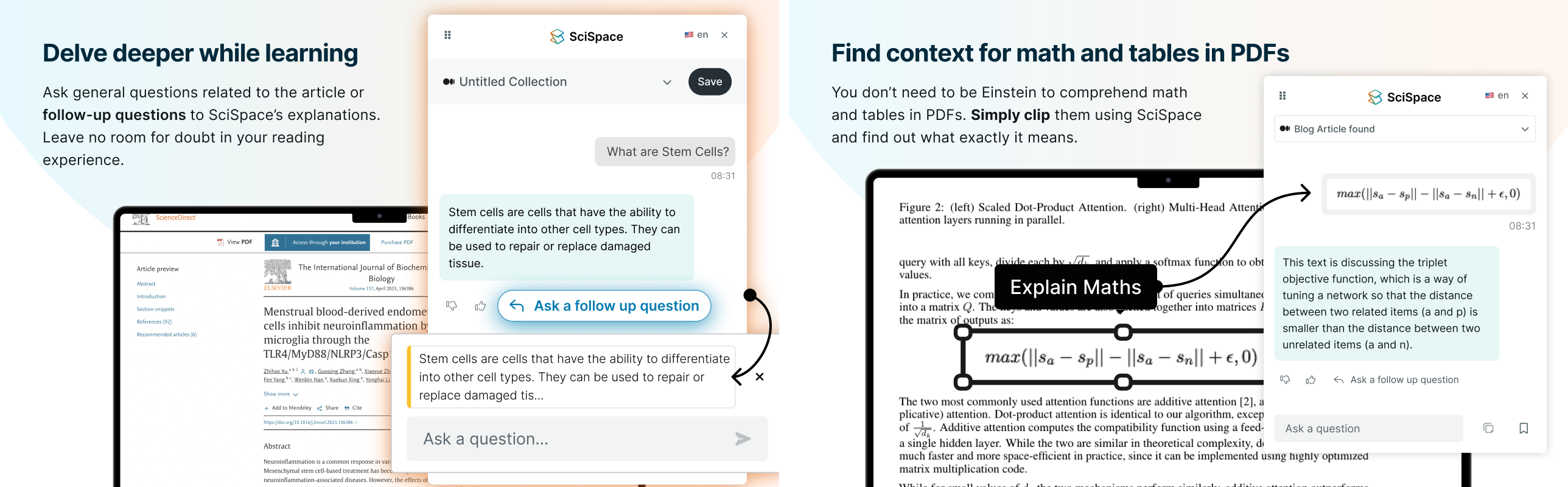
SciSpace explains content written in technical terms in an easy-to-understand way, and its chat function lets you thoroughly understand a paper's content. It also recognizes PDFs, so when you select a formula in a paper, it analyzes that formula and explains it. It supports a wide range of languages, including Korean, so it should be easy to use!
SciSpace ? Go to it
Can't find the AI you need?
The truth is, the tasks people do vary widely depending on the company and the job. That makes it even harder to find an AI service that fits your company's work exactly—so if there's a simple, repetitive, tedious task at work you'd like to replace with AI, reach out to Dalpha!
Dalpha rapidly develops AI services specialized for the wide range of tasks that countless companies handle. You can browse the AI Store yourself to see AI being used in so many areas—video editing, translation, research, customer service, and more!

Jinsu Choi