What Is OCR? OCR Program Recommendations, Korean OCR Open Source, and 4 AI OCR Use Cases
These days, we do all our work digitally.
But still — PDF documents, Excel, photos, handwriting, screenshots, recordings, and more —
the formats of data used in work are so varied.
While people transcribe, enter, classify, create materials, and write reports,
don't you ever think, 'Do humans still have to do this?'
Today, let's learn about the AI technology most used for work automation,
OCR (Optical Character Recognition).
From OCR's meaning,
to AI OCR tools built into basic programs that you can use right away with no installation,
to free open-source API tools usable for work,
and further, real companies' cases of integrating AI solutions like OCR, LLM, and STT —
we'll organize how they smartly automated, with concrete cases.
1. What is OCR?
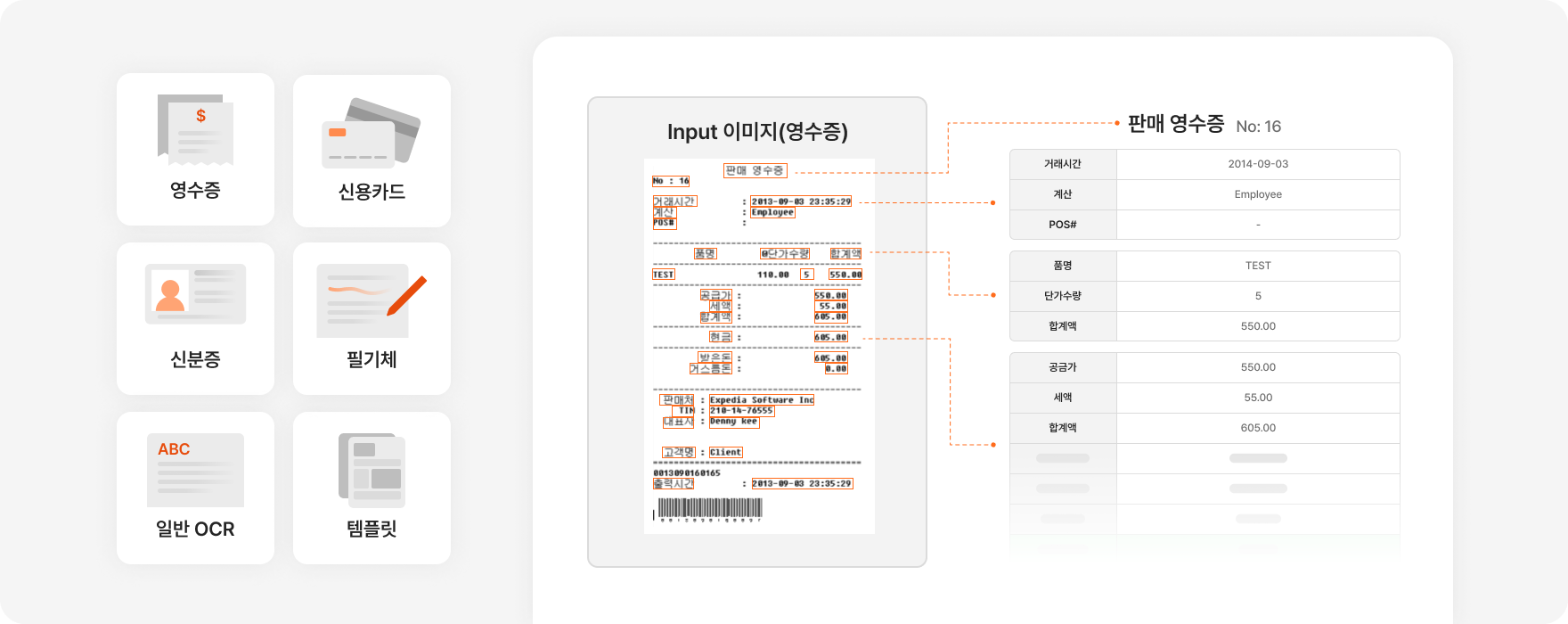
OCR (optical character recognition) is technology that converts text contained in image files (e.g., scans, photos) into a machine-readable format. In other words, simply put, it's technology that recognizes characters in images or PDFs and extracts the text.
For example, when you scan a form or receipt, the computer saves the result as an image file, and in that state it's hard to use the text for editing, searching, word counting, and so on.
When you apply OCR, you can extract the characters in the image and save them as text data, so they can be used immediately in various work systems or analysis tools.
Why is OCR important?
Most corporate work still includes processing various forms, invoices, and contracts as paper documents.
In the end, the formats of the data actually used are so varied — scanned images, PDF documents, real photos, handwriting, screenshots, recordings, and more.
To use such materials in digital work, people have to re-enter the content one by one or go through separate manual work, consuming a lot of time and cost.
But if you adopt OCR technology, you can convert the text in these images directly into digital data, enabling search, analysis, automated processing, and more.
In other words, it becomes a key driver that raises work efficiency, simplifies processes, and improves productivity.
So shall we look at how you can use this AI OCR?
2. OCR program recommendations
1) Image/PDF OCR tools
First, let me introduce 2 OCR tools that are built in by default and easy to use.
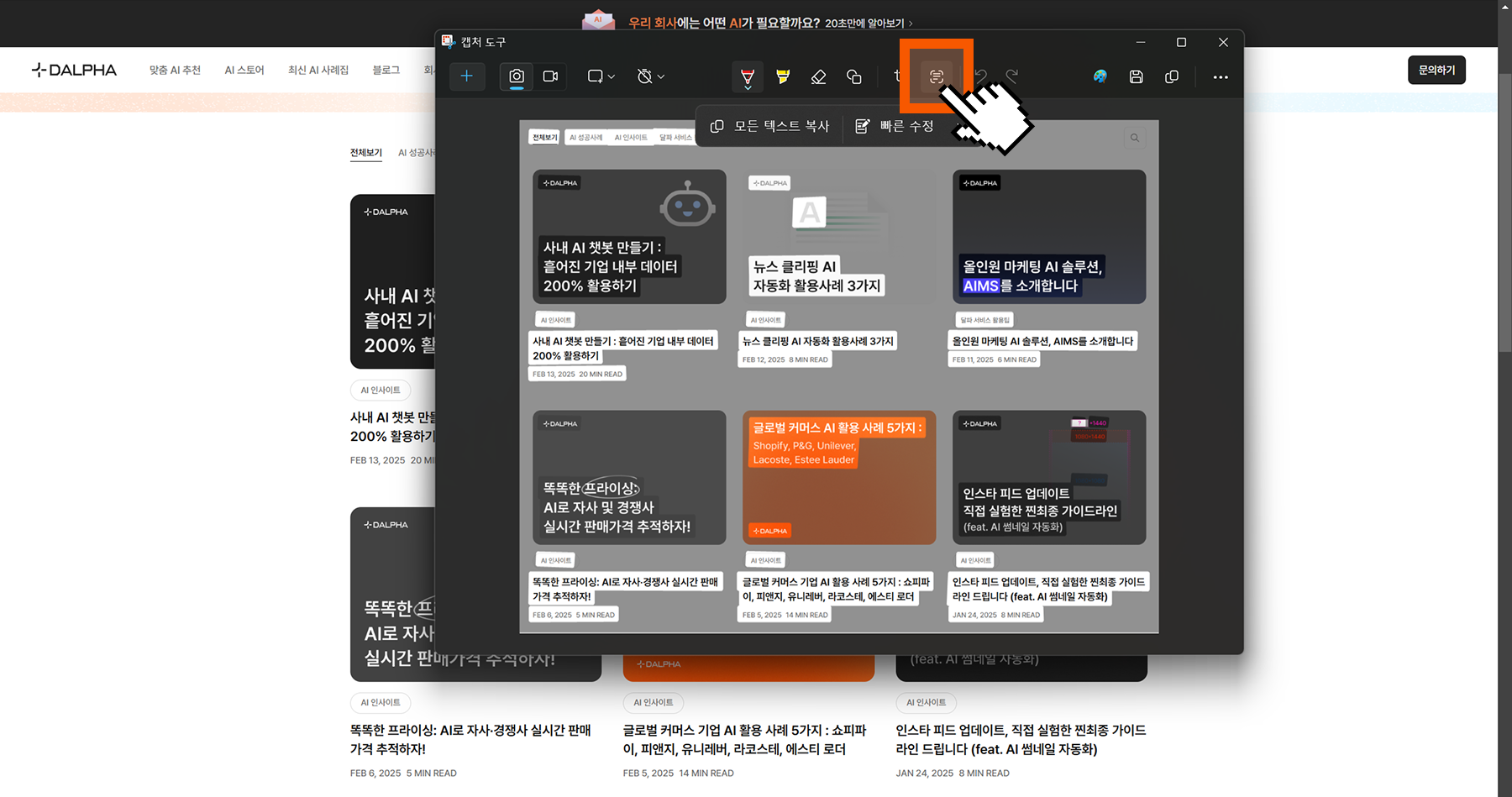
Windows Snipping Tool: extracting text
Did you know AI OCR is built into the Windows Snipping Tool?
Capture the screen/image you want to extract text from, then click the 'Text Actions' button, and AI extracts the text in the captured image. You can copy or drag all the text to use it.
Google Drive: extracting text documents
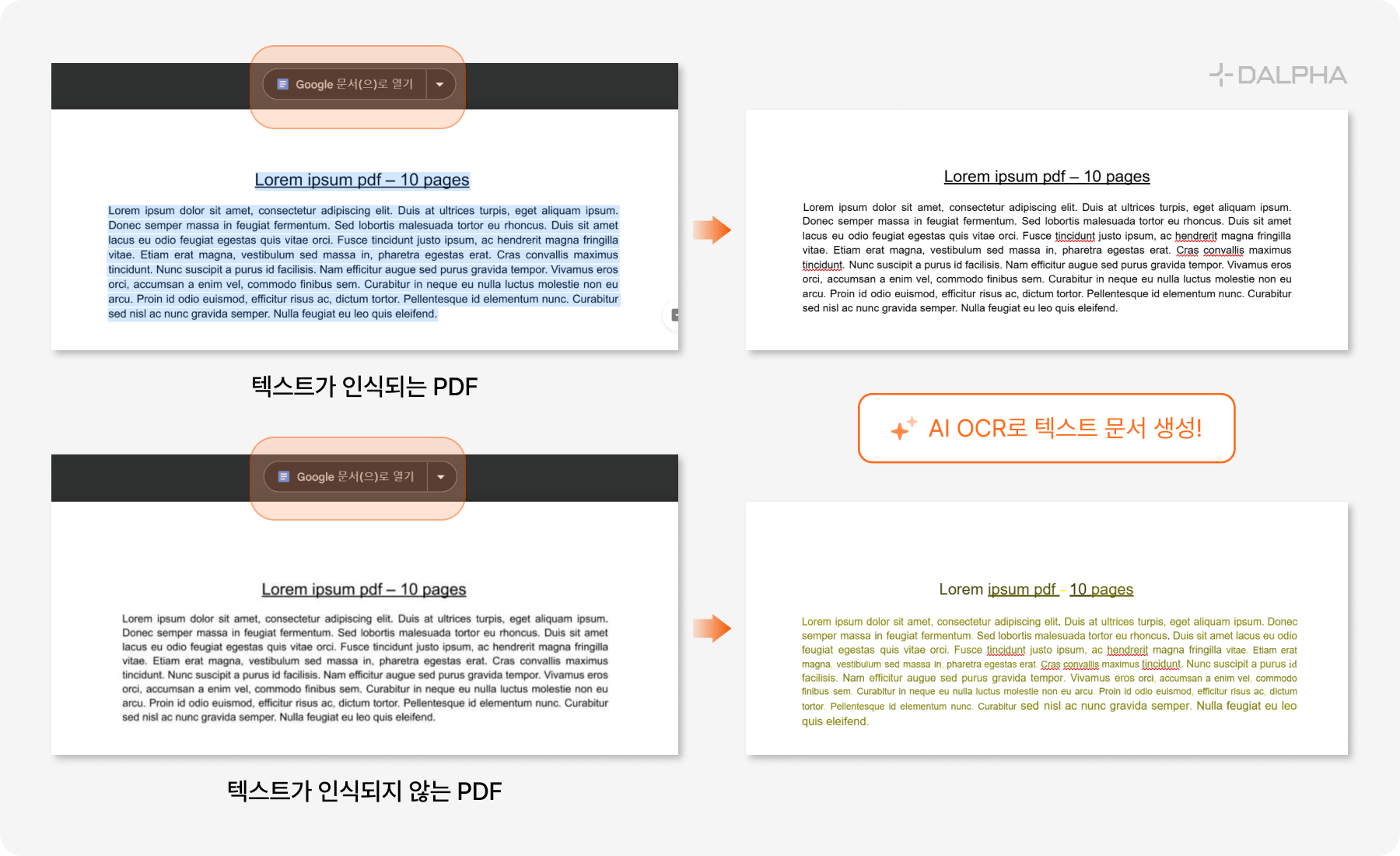
Google Drive also has a built-in OCR feature.
Upload a PDF or image under 2MB to Drive, and select 'Open with Google Docs' or 'right-click > Open with > Google Docs,' and it automatically recognizes the text and extracts it as a document.
You can confirm it extracts well even when the PDF's text can't be dragged or copied.
2) Korean OCR open-source / API tools
Next, let me introduce OCR tools that can recognize Korean and support API calls.
The open-source tools are as follows. Being open-source, they can be used without limit, but their Korean-recognition performance is relatively lower than paid tools.
Tools that aren't open-source but support API calls are as follows. They're subscription-based paid tools, but have a monthly free quota. Their Korean-recognition performance is excellent.
Google Cloud Vision (1,000 free per month)
Azure Document Intelligence (500 free per month)
Naver Clova (300 free per month)
3. 4 use cases of AI OCR
Let me introduce 4 AI solutions with which companies automated their work using OCR!
Document processing and data-entry automation
Report auto-generation AI
Image-text translation and inpainting AI
Product-info category classification and DB building
I'll also introduce real cases where each AI solution was used in a company-tailored way.
1) AI OCR case 1 — Document processing and data-entry automation
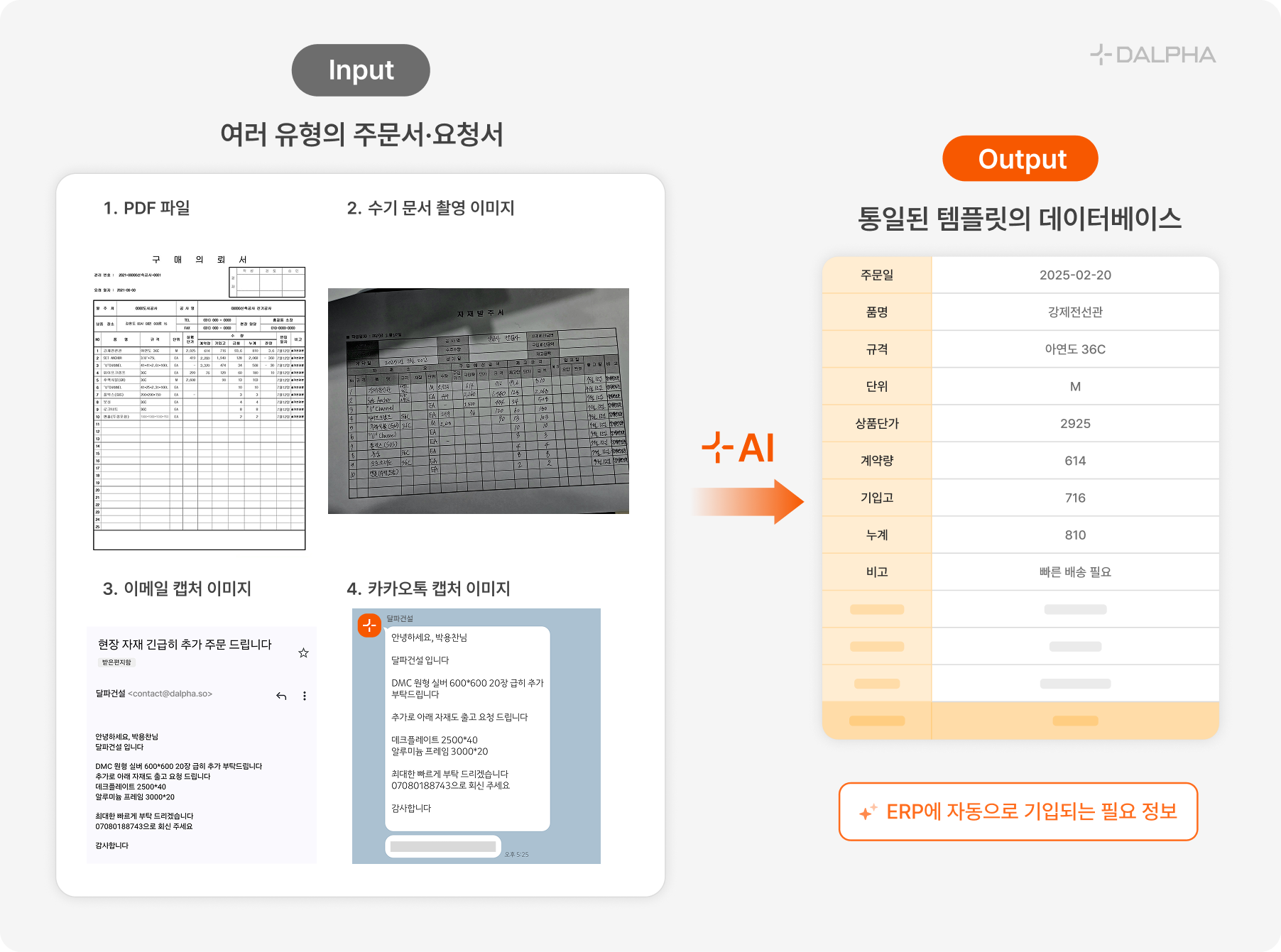
Order-form entry automation case
An AI solution case that extracts and analyzes text from images of various order forms, purchase orders, and request-for-quotation documents, and auto-enters it into a predefined template.
Problem:
The document template each client uses differs
Ordering methods are varied — offline/online submission, email, KakaoTalk, etc.
Entering order content by hand consumes a lot of manpower and time
Solution:
It takes various files (Word, Excel, PDF, image) as input and extracts text.
It analyzes the extracted text with an LLM (large language model) to pick out the needed information
It auto-builds a database with the predefined template.
It's also auto-entered into the ERP (enterprise resource planning system), enabling digital data processing
Résumé entry automation case
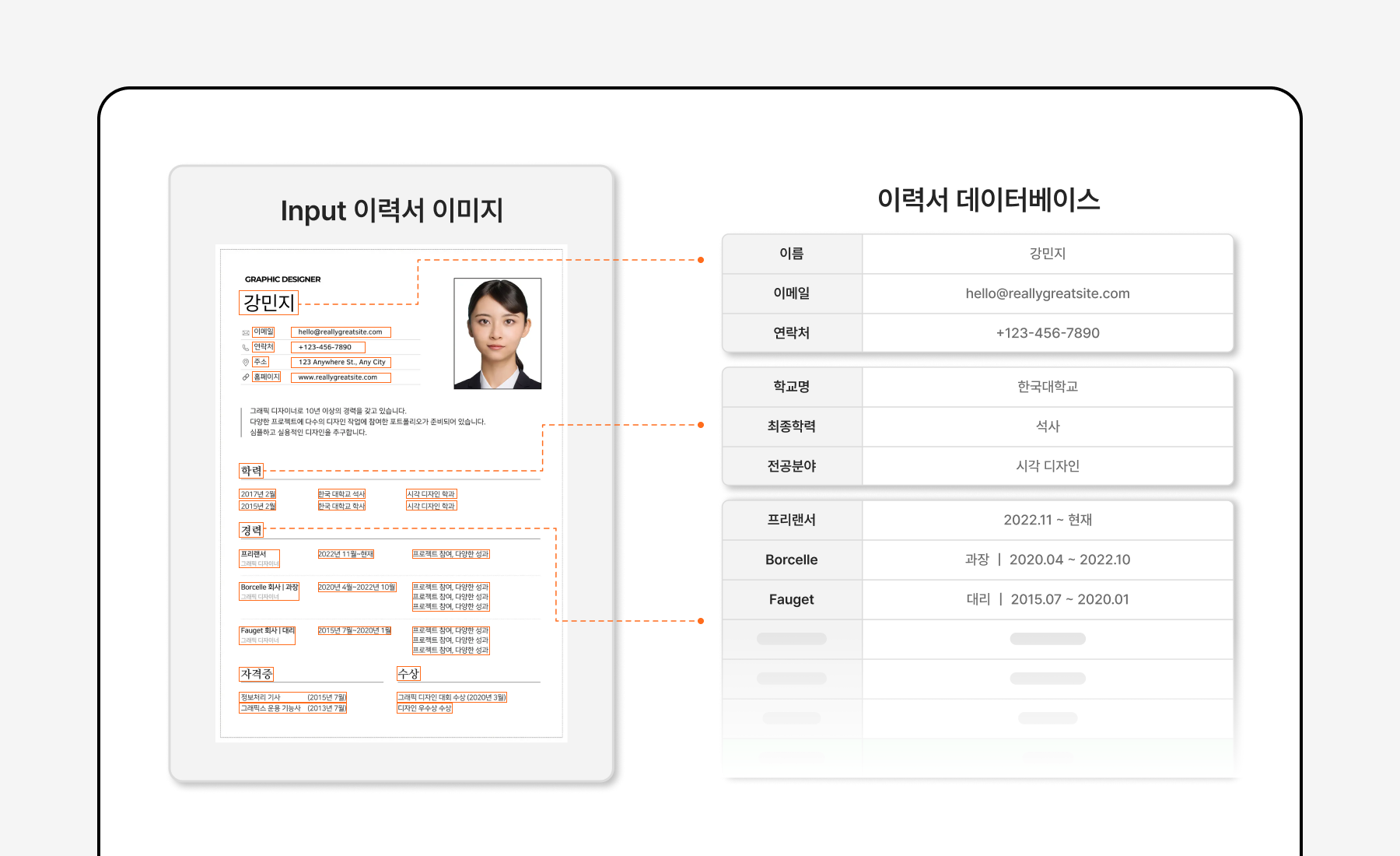
In a similar case, a recruiting platform adopted an AI solution combining OCR and LLM to organize various résumé formats into a single database.
Problem:
At signup, separate from the résumé, users had to go through a separate profile-info entry process
Each user's résumé template differs, making it hard to standardize résumé data
Solution:
Just upload a résumé and a profile is auto-generated from the extracted information.
By simplifying the user's profile-upload process, it reduces drop-off during signup
With a standardized database, it streamlines internal processes.
By analyzing résumé data with an LLM — pass-rate prediction, résumé feedback, etc. — it provides various extended services.
When AI analyzes such digitized input documents, it can also automatically write things like a 'quarterly performance report.' Shall we look at report generation in detail too?
2) AI OCR case 2 — Report auto-generation AI
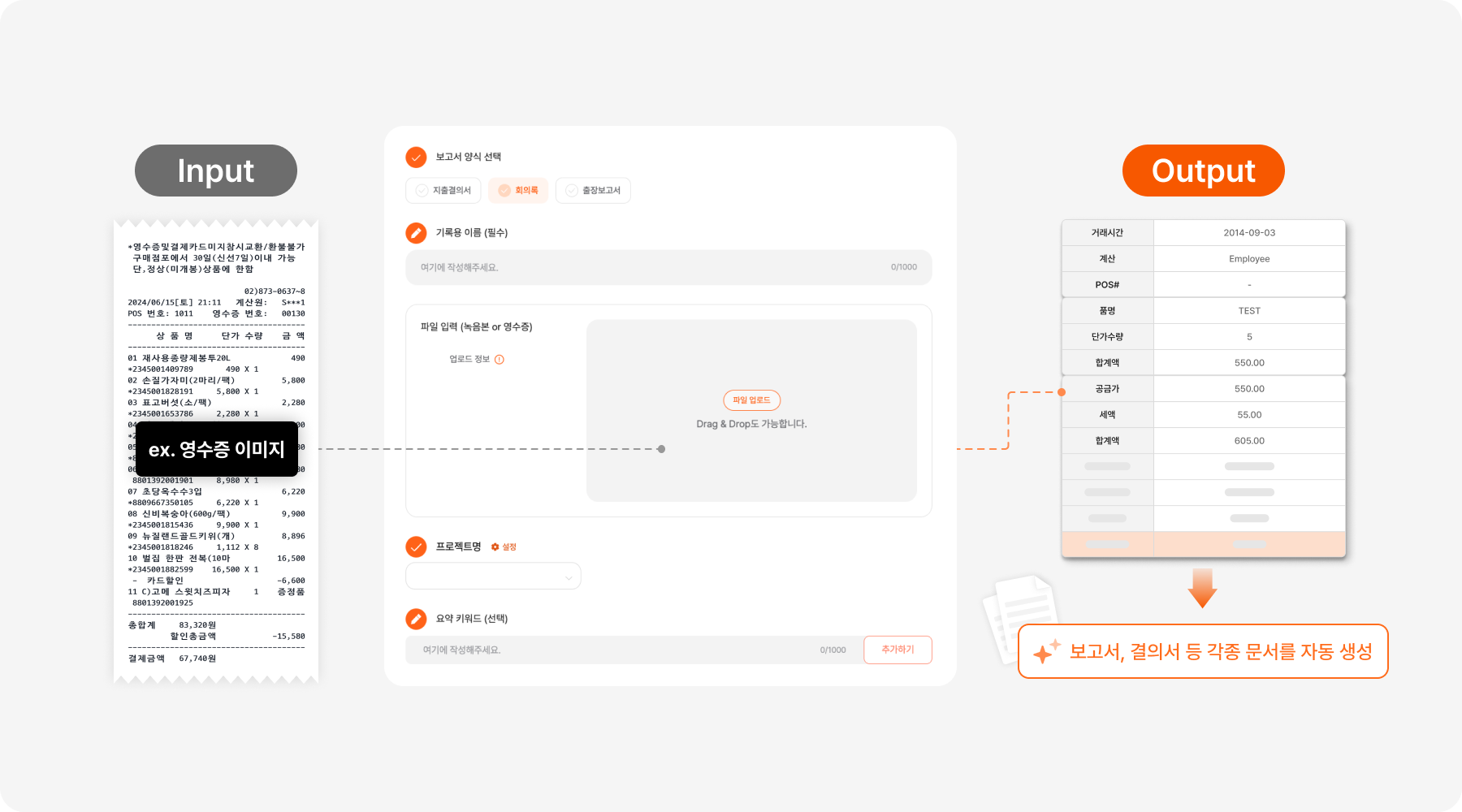
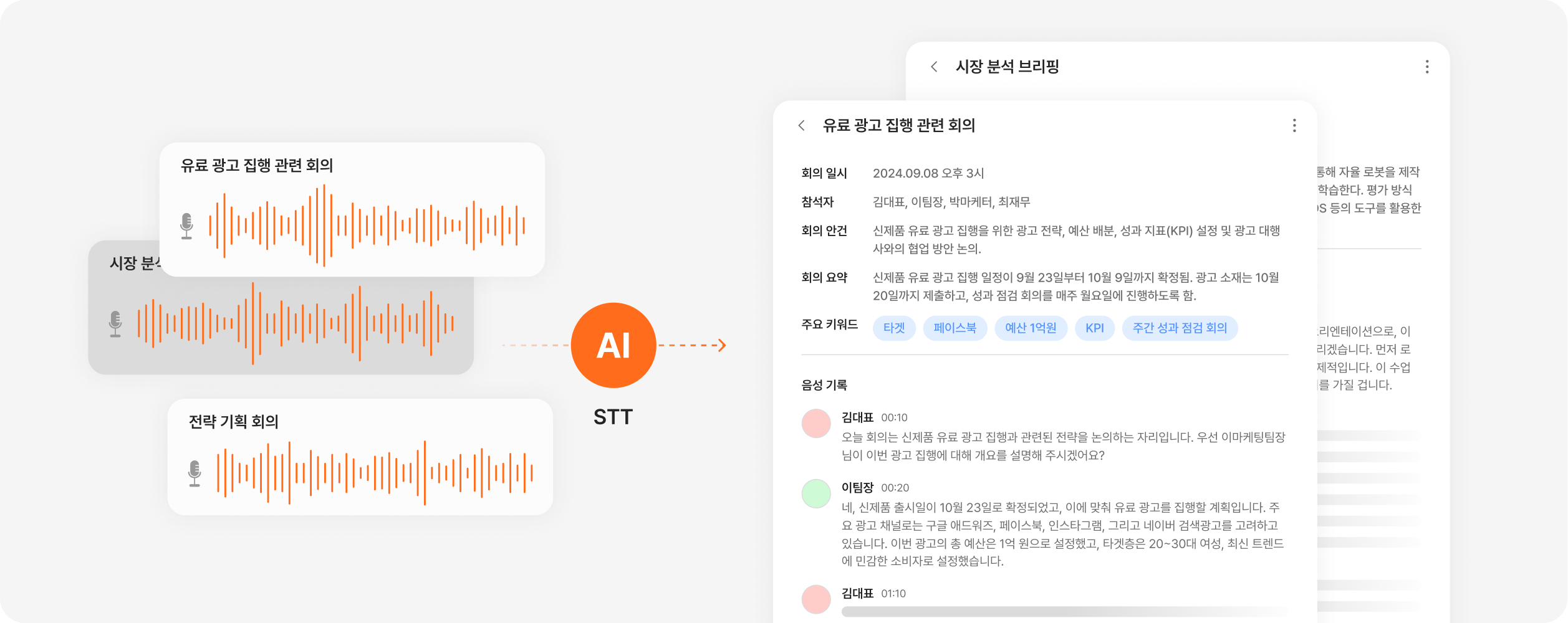
Combining OCR (image-text extraction), STT (speech-to-text), and LLM (large language model), this is an AI solution that auto-generates a report when the user inputs handwriting images, receipt images, or meeting-recording audio and picks a template.
Internal-document auto-generation case
Problem:
Repetitive internal document work — expense-approval forms, meeting minutes, trip reports, quarterly performance reports, etc. — consumes manpower
When data of multiple formats is used for report writing, the work system becomes fragmented
Solution:
Within a single AI tool combining OCR and STT, it takes data of various formats — receipt images, meeting recordings, handwriting photos, etc. — as input and extracts the text
It extracts the needed data with an LLM, using customized classification criteria
To fit the needed template, it automatically maps fields and generates the report.
You can generate an expense-approval form from receipt images, meeting minutes from a meeting recording and handwriting photos, or a quarterly performance report from various input data like management/financial status and work results.
Client-response automation case
Problem:
Client emails about orders, errors, etc. are checked by people directly, causing time lags and omissions.
Because for each response you have to convert the client's format into the internal document format, then re-report the internal discussion document and send it to the client, an unnecessarily large amount of time is spent on template conversion.
Solution:
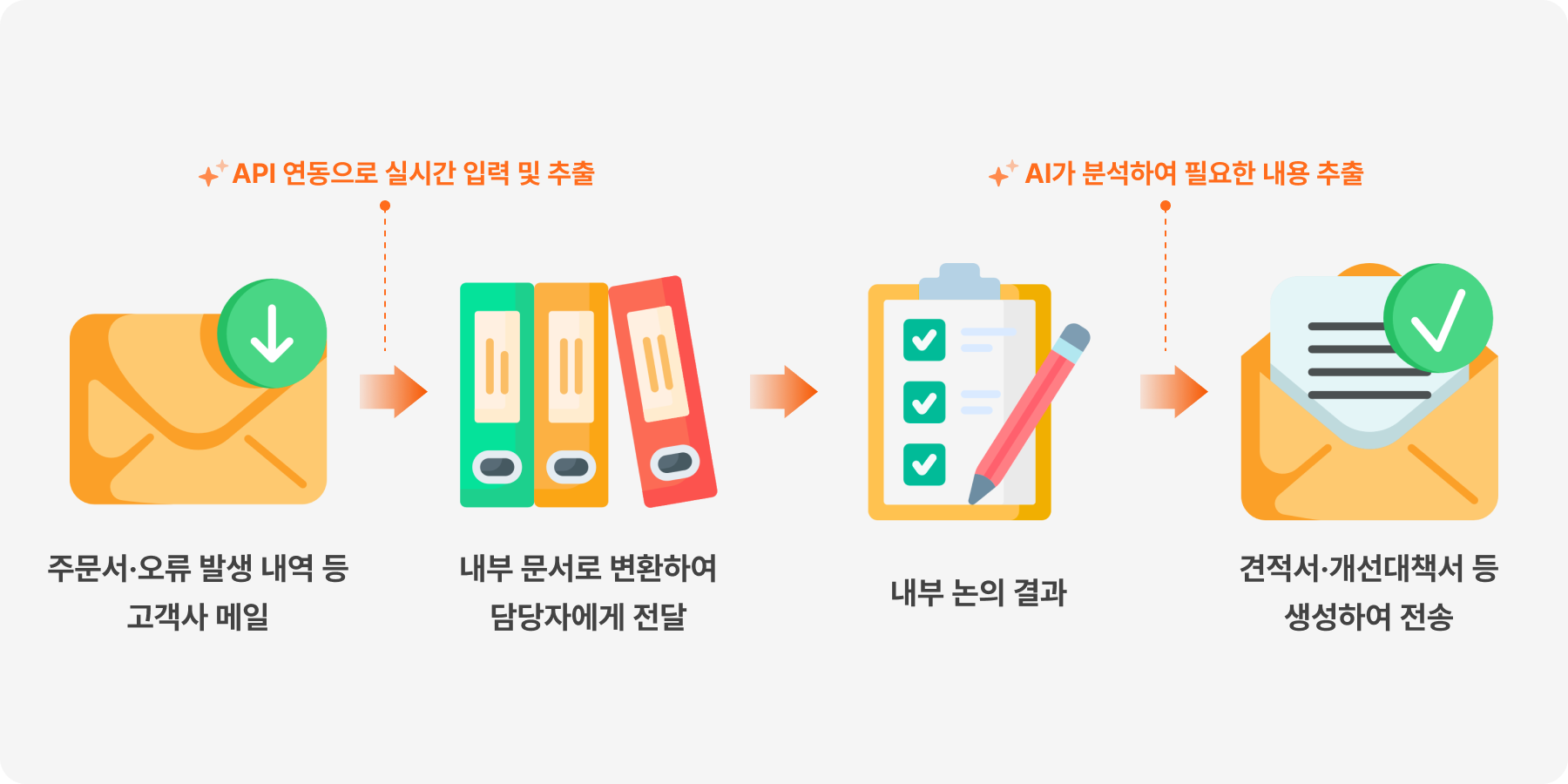
It connects the document-entry automation tool introduced earlier with an email API to take input in real time.
It automatically converts the input client document into an internal report and sends it to the person in charge.
It analyzes technical internal-discussion documents, such as error resolution, extracts only the needed content, generates a report in the set template, and sends it to the client.
In particular, Dalpha's AI solution
is planned in a company-tailored way through detailed discussion at the consulting stage, so it can build the tool each company can use most efficiently.
Now, beyond document processing, shall we look at a case where AI OCR was used for image processing?
3) AI OCR case 3 — Image-text translation and inpainting AI
Global-expansion F&B company case
Problem:
When expanding globally, translating and redesigning existing product images consumes a lot of manpower and time
Every time an export country is added, design resources double
Because of the extra work, an update time lag arises between domestic and overseas, reducing marketing efficiency
Solution:
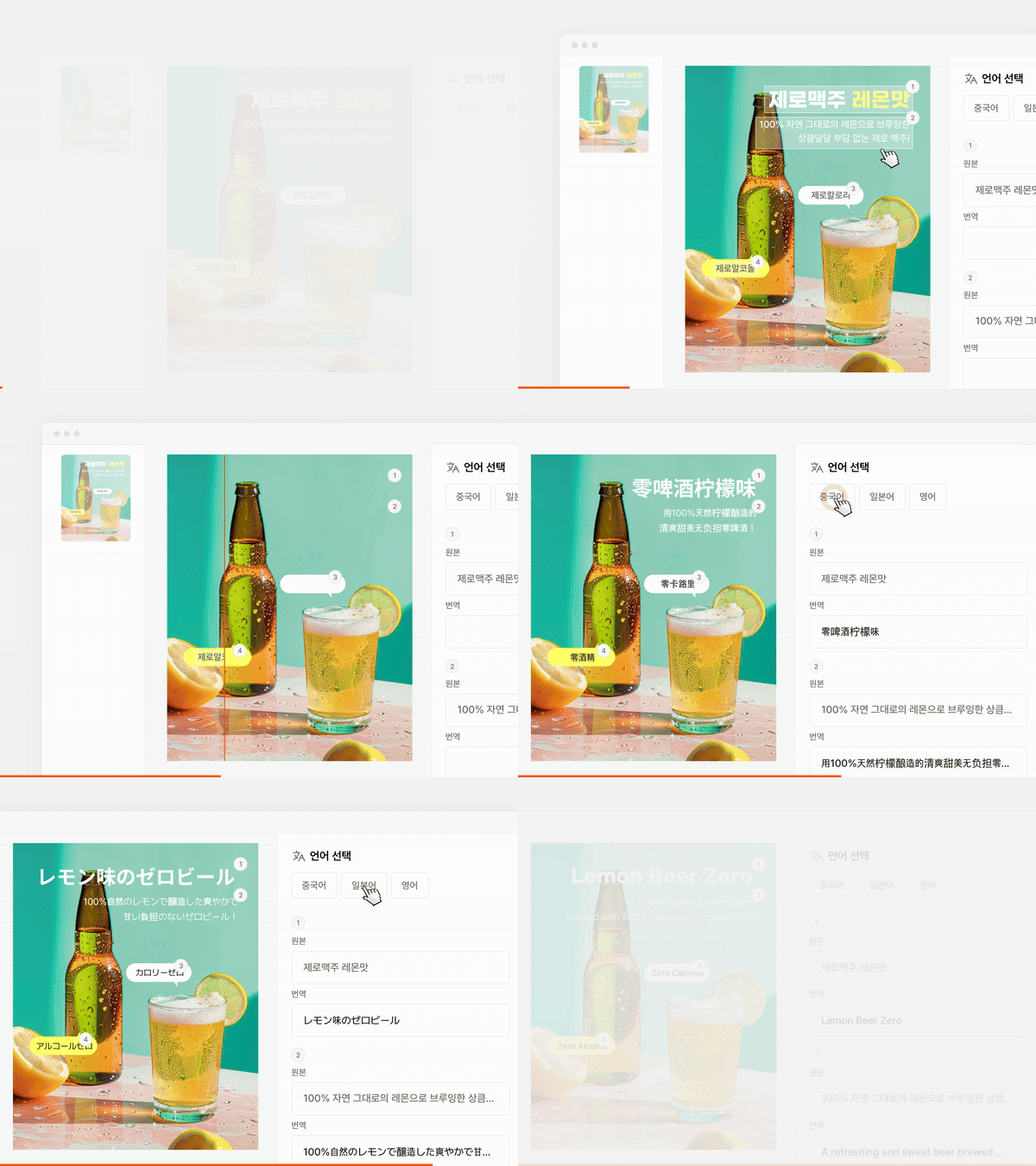
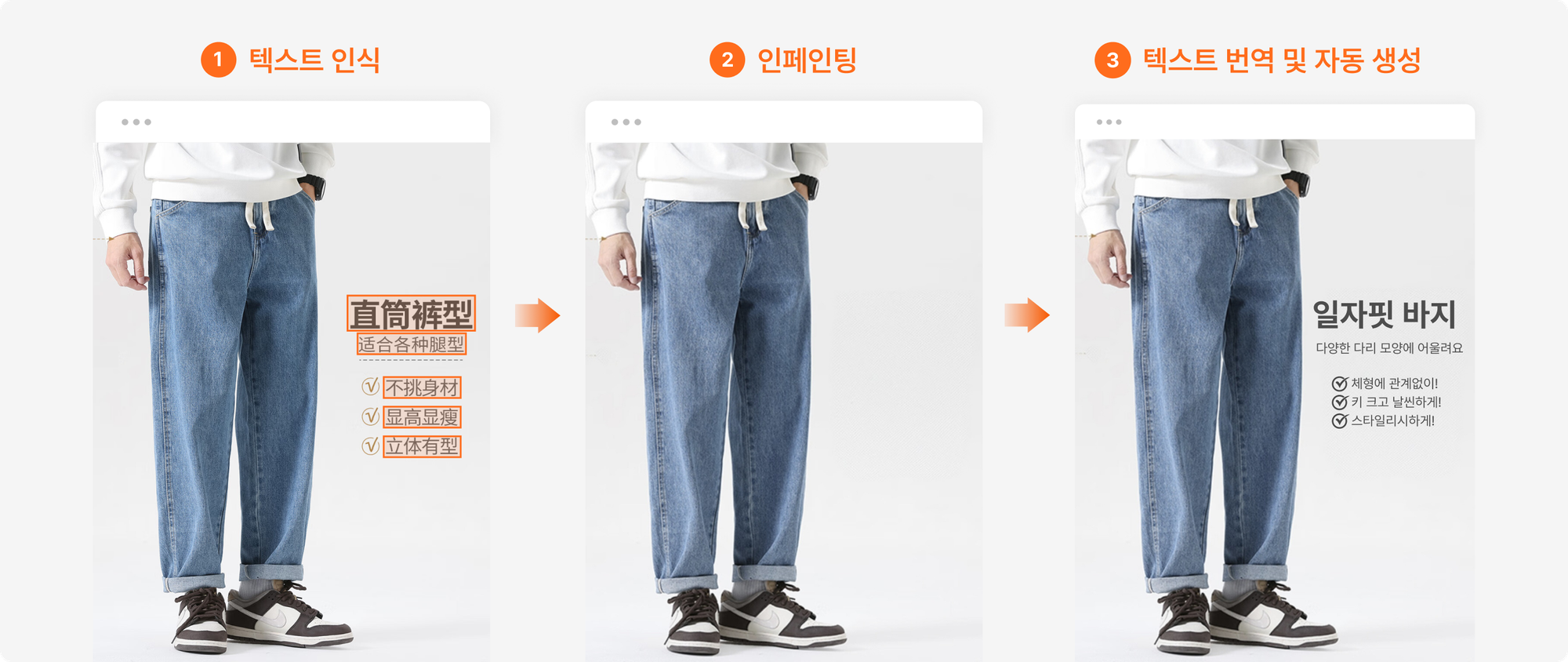
It automatically recognizes Korean text in the original image, inpaints it, then auto-generates translated text in various languages — Chinese, Japanese, English, etc.
It can, for global expansion, cut design resources while proceeding quickly with no delay.
Recognizing and translating numerous languages with a single tool lowers the barrier to entering new countries
China-apparel direct-import company case
Problem:
A wholesale/retail platform that directly imports and sells Chinese apparel, importing various clothing from various suppliers
Using translated product images noticeably boosts sales, but there are so many products that design resources can't be spent on each one
Solution:
From the product's main image, it extracts the Chinese text and removes it with AI inpainting.
On top of the inpainted image, it automatically generates Korean text translated from the extracted Chinese.
Using translated product images without extra design resources, sales rose meaningfully
4) AI OCR case 4 — Product-info category classification and DB building
Product-image OCR can be used not only for inpainting but also for database building. First, let me additionally introduce an AI solution that automated work at the same company as above.
China-apparel direct-import company case
Problem:
A wholesale/retail platform that directly imports and sells Chinese apparel; because it imports various clothing from various suppliers, the format and terminology of product info aren't standardized
Translating detail images and manually extracting and organizing product attributes (color, size charts, etc.) consumes considerable manpower and time
Solution:
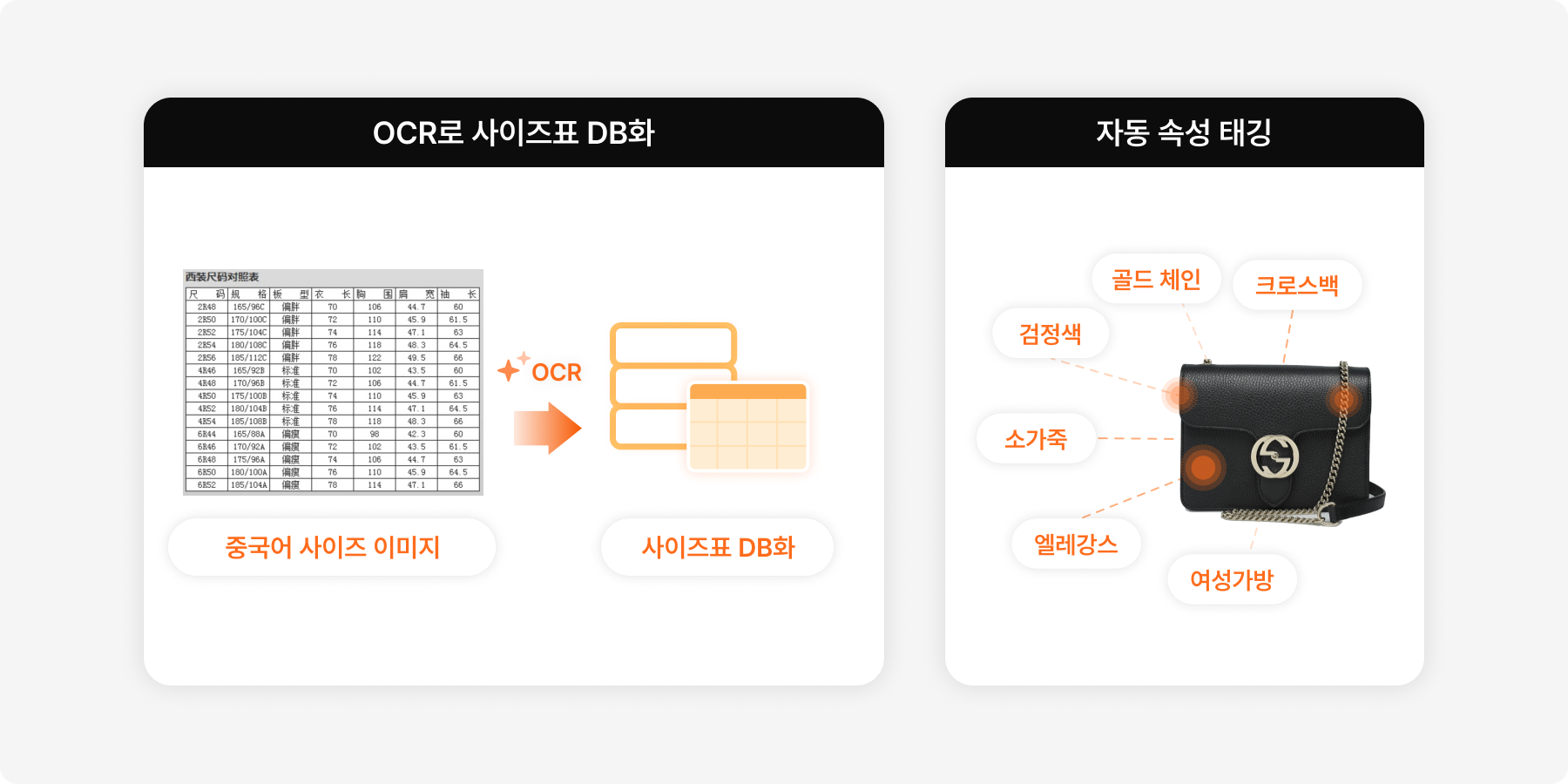
From the product's detail-page images, it automatically extracts and translates the text.
It collects size charts into a predefined format, organizes them,
builds a database, and through it standardizes the product management system.When an LLM comprehensively analyzes product info to automatically tag attributes and sort items into the right category, people only review the needed content, streamlining the work
Standard product-DB building solution case
Problem:
This company, as an economic organization, needed to build a standardized product database from various product types — processed/fresh food, fashion/education/furniture goods, and more
Because the format of info notation differs by type, supplier, and product, they were entering it all by hand.
Solution:
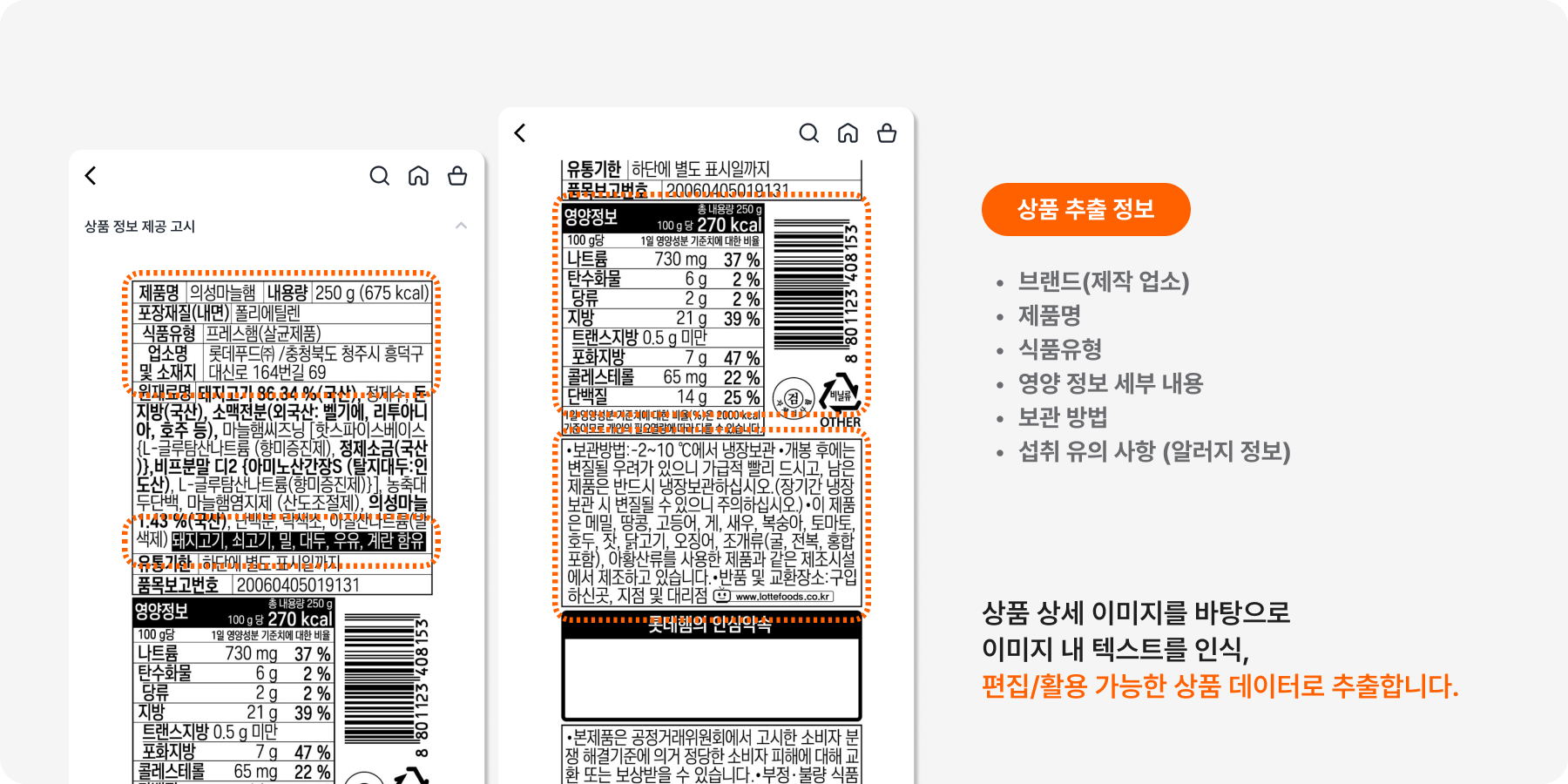
They implemented a product-detail image analysis and DB-building solution combining OCR and LLM
From input data of various formats — various suppliers and products, actual product detail-info photos, online detail-page images, etc. — it can extract standardized information
The built DB is used in various ways — statistics, analysis, sales, corporate strategy, and more
Adopting an OCR program tailored to your company
So far, we've looked concretely at what OCR is, how to use it,
and how it's used in companies
Being able to convert image-based documents into text data
offers accuracy and expanded possibility beyond simple work automation.
Through a company-tailored AI solution combining OCR and various AI,
how about upgrading your company's work efficiency?
At Dalpha, through 1:1 consulting,
we plan and build, optimized for each company and field, a custom AI solution for you.
Free consultation — if you're interested, reach out anytime!
Inquire about a custom AI OCR solution

Serin Choi