The Complete Guide to ChatGPT Prompt Engineering: Templates, Writing Tips, and Examples
Today, let's talk about prompt engineering.
We'll focus in particular on the most widely used AI model, how to write prompts in ChatGPT—we'll take a close look at that.
Starting with CO-STAR, a template you can apply universallyto any prompt,
Markdown formatto improve prompt quality,
leveraging ChatGPT custom settings well, practical examples of cutting down on repetitive work—we'll show you all of it.
At the end, we'll give you a checklistyou can refer to whenever you write prompts going forward, so stick with us to the end!
1. What Is Prompt Engineering?
1.1. The Meaning of Prompt Engineering
Prompt engineering is a technique for designing clear, structured commandsso that artificial intelligence (AI) accurately understands a user's request or question and provides the desired response. You could call it the process of helping you get the most out of a model's performance by asking questions the AI model can easily understand.
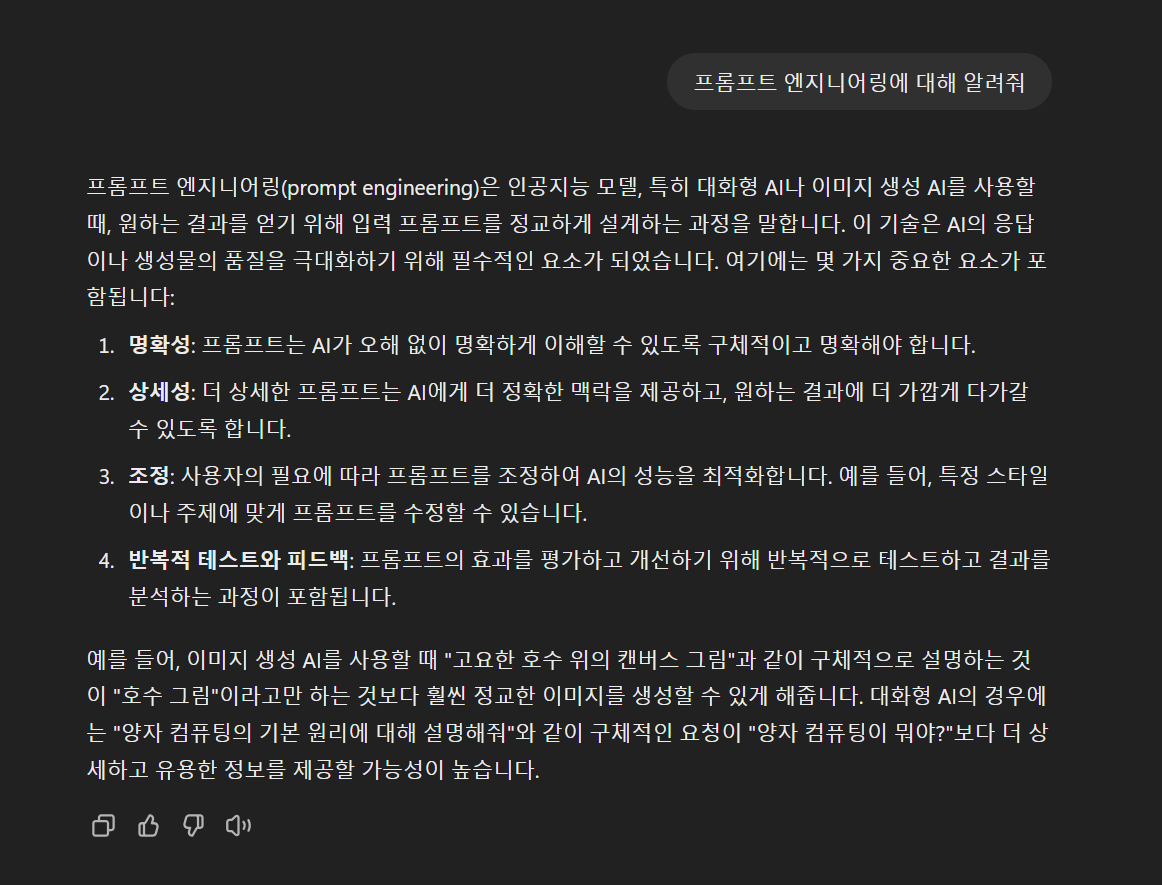
Let's ask ChatGPT about prompt engineering, so we can show you the concept and an example at the same time.
Since LLMs like ChatGPT are AI models that understand context, asking without explaining the context gets you only answers that sound plausible but actually contain no useful information, as in the picture below.
What happens when you ask with specific context, like below?
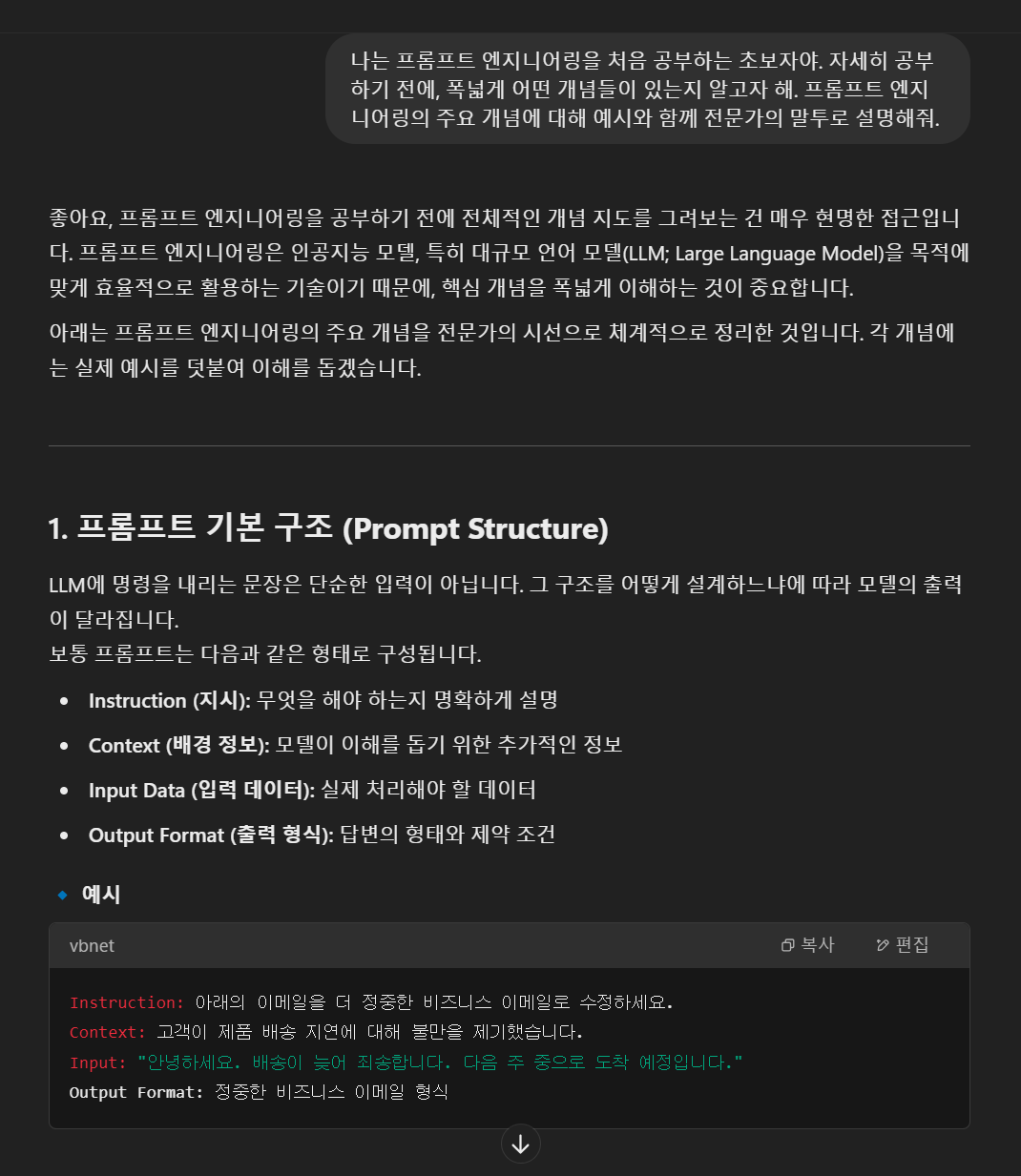
Now we've learned about the basic structure of a prompt!
You can clearly see the quality of the answer improved. But is the way I asked the best approach? Isn't there a better way?
Let's find out how to write even better prompts through the templates and writing tips we'll introduce next.
1.2. Why You Should Learn ChatGPT Prompt Engineering
Before we dig into the concepts, shall we first look at why we should learn ChatGPT prompt engineering?
From individuals to enterprises, ChatGPT is the most universally used AI modelof all.
Individuals
Every time you use ChatGPT, that 'better than expected, yet worse than expected' side of GPTmay have left your amazement turning into frustration before you knew it.
But just learning the basics of prompt engineering can significantly reduce this kind of inconvenience and let you get the results you want far more efficiently within limited tokens and time.
ChatGPT is being used broadly, in ways such as:
Writing (blogs, cover letters, papers, emails, etc.)
Research (summarizing papers, searching for materials, etc.)
Everyday life (travel planning, advice, creative work, etc.)
Coding (writing code, debugging, guidance on how to use tools, etc.)
Lately in particular, using GPT for coding has become standard across every field. From this perspective, prompt engineering can be called an essential skill for every developer.
Enterprises
At the enterprise level too, ChatGPT is currently the model used in the most AI projects.
So if you're an AI engineer or someone planning AI projects, making sure you understand ChatGPT prompt engineering will benefit you in many ways.
So now, shall we start with the most basic template you can use in ChatGPT prompt engineering?
2. The ChatGPT Prompt Template: CO-STAR
2.1. What Is the CO-STAR Framework?
The CO-STAR template is a framework for structuring prompts more systematically.
It's a concept that first appeared in an
article by Sheila Teo—the prompt engineer who won the 'ChatGPT Prompt Royale' competition hosted by the Singapore government.
When you write prompts using this template, the AI can easily understand the user's context, so you get exactly the results you want.
CO-STAR includes the following six elements.
Context
Explain what situation the question or request is in
ex) "This piece is a guide explaining ChatGPT prompt engineering, intended to be uploaded to the company blog."
Objective
Specify the desired result or goal
ex) "Please write it so that readers can easily understand the concept of prompt engineering and even learn, through examples, how to actually structure ChatGPT prompts."
Style
What format you want the answer to come in
ex) "It's in the format of a blog post that conveys professional content."
Tone
Setting the mood and feel
ex) "Use a polite declarative style for a slightly casual yet professional feel. Please use short, easy-to-read sentences."
Audience
Who reads this piece
ex) "It's aimed at beginners who want to study ChatGPT prompt engineering."
Response
Concretely specify the actual output format
ex) "Please write a roughly 1,000-character piece with 3–5 subheadings."
2.2. A CO-STAR Example
When we introduced the CO-STAR template above, we used "the situation of writing a blog about prompt engineering" as an example. Putting it together gives the following prompt.
This piece is a guide explaining ChatGPT prompt engineering, intended to be uploaded to the company blog. Please write it so that readers can easily understand the concept of prompt engineering and even learn, through examples, how to actually structure ChatGPT prompts.
It's in the format of a blog post that conveys professional content. Use a polite declarative style for a slightly casual yet professional feel. Please use short, easy-to-read sentences.
It's aimed at beginners who want to study ChatGPT prompt engineering. Please write a roughly 1,000-character piece with 3–5 subheadings.
Because the AI understands the context, objective, and format, you get an answer far closer to what you want than if you simply said, "Write a piece about ChatGPT prompt engineering."
So can you apply CO-STAR in areas beyond writing? Let's show you an example by imagining a situation where you ask ChatGPT to write code.
Example Prompt for Writing Python Code
Context: "This is an assignment where, in Python, I need to take space-separated integers from a text file and sort them with Merge Sort."
Objective: "The code should be short and concise, but it must read space-separated integers from a text file and output the sorted result."
Style: "Use only basic Python syntax, and write it readably with a few simple comments mixed in."
Tone: "Explain step by step in easy sentences so a beginner can understand."
Audience: "A student learning Python for the first time."
Response: "Please provide minimal example code, with comments, that takes a list of integers from a text file, sorts it with Merge Sort, and outputs the result."
Do the examples give you a slightly better understanding of how to use the template? As you can see, it's worth remembering that CO-STAR is a handy framework you can use as a baseline for writing every type of prompt, regardless of the field it's applied to.
Now that we've covered the basic template, let's explain tips for writing ChatGPT prompts, split into two parts: 'Markdown format' and 'leveraging custom settings.'
3. ChatGPT Prompt Writing Tip 1: Custom Settings
When using ChatGPT, there are times you have to repeatedly type in similar requests or background explanations.
In these moments, leveraging the Custom Instruction feature lets you do prompt engineering much more conveniently.
3.1. How to Set Up ChatGPT Custom Instructions
(1) Open the Custom Instruction Menu
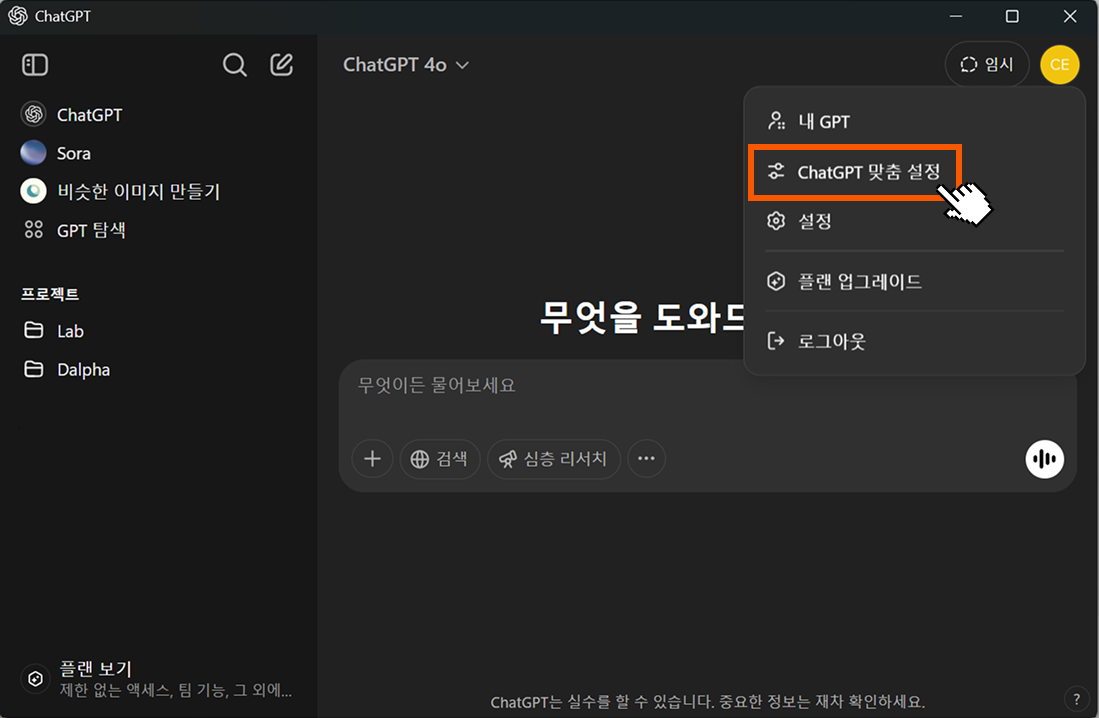
On the ChatGPT home, click the user icon.
From the menu that appears, select "Customize ChatGPT."
(2) A Tour of the Settings Area
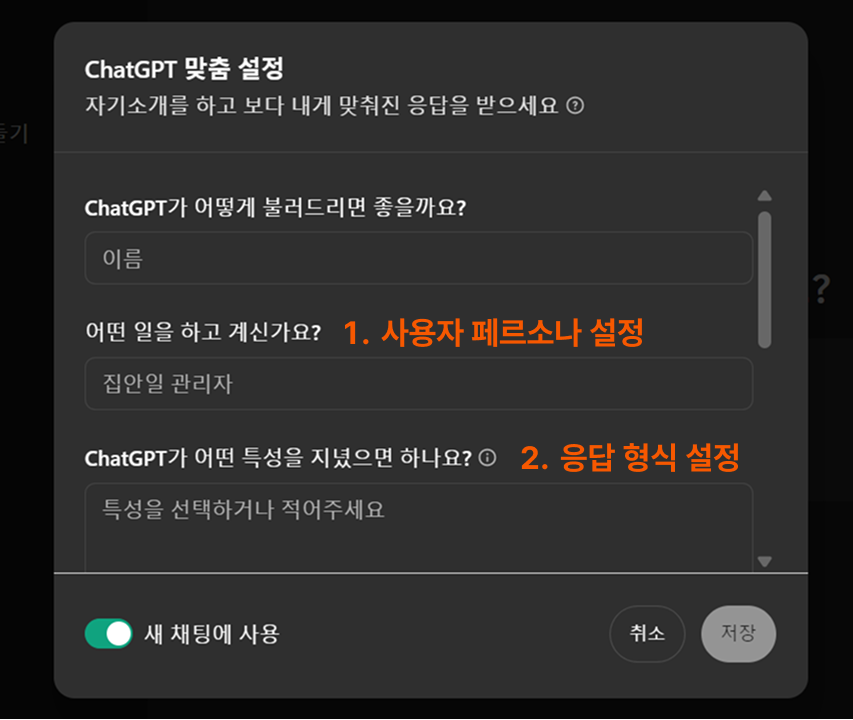
Now the Custom Instruction pop-up opens, where you can configure two things.
What do you do?
Set the user persona. If you write down your role, hobbies, or specific requirements, ChatGPT will refer to them when crafting answers.
ex) "I'm a Python developer and I prefer concise code."
What traits should ChatGPT have?
Set ChatGPT's response format.
You can write what style you want the answers in (tables, lists, lengthy explanations, etc.) and how detailed they should be (brief summary vs. in-depth analysis).
Let's take a closer look at detailed examples of custom settings below.
TIP: To reduce token usage, it's good to write in English.
The examples are written in Korean for the convenience of readers.
3.2. Use Cases for ChatGPT Custom Settings
(1) Use Cases for the User Persona Setting
Beginner Python developer
"For lengthy code, please show it split out by function."
"Follow the DRY (Don't Repeat Yourself) principle and briefly consolidate any duplicate logic."
Blog content creator
"Suggest 3–5 SEO-optimized search keywords, and show an appropriate subheading for each keyword."
"Summarize the final piece in 1–2 sentences so it works as a simple preview when shared on social media."
(2) Use Cases for the Response Format Setting
Omitting unnecessary context explanations
A situation where ChatGPT lengthily repeats introductions and conclusions, but you want to quickly check only the key information.
Example
"Please omit the context explanation and present only {Message.Content}. "
"Minimize repetitive and unnecessary sentences to reduce the text length."
Citing information sources (papers) in a specific format
A Q&A situation in a specialized field where you need to cite references or research papers.
Example
"When mentioning a paper, please cite it in APA format."
"Where possible, also add the DOI link. e.g. (Smith, 2020; doi:10.1234/abcd)."
Showing only the modified parts of code
A situation where you prefer highlighting only the changed lines instead of showing the entire code over and over.
Example
"When presenting modified code, please omit the parts that haven't changed.
"For the parts that differ from the previous code, add a comment like
// Changedor mark them in a different color."
4. ChatGPT Prompt Writing Tip 2: Markdown Format
4.1. What Is Markdown Format?
Markdown is a syntax that uses special symbols in a plain text file to easily express the structure of a piece of writing.
For example, #lets you mark a main heading, and symbols like -or * let you create list items. It's widely used because it's readable even without a dedicated editor, and documents written in it render nicely on the web and in various tools.
In particular, when entering long prompts into LLM models like ChatGPT, Markdown format has the advantage of making it even easier for the AI to grasp the context.
4.2. How to Use Markdown Format
When writing a Markdown document, mastering just the following four elements is enough to write a clear, well-organized piece. Let's look at how to use each one and the effect it has when used in a prompt.
(1) Heading
Definition: A feature that distinguishes a document's titles and subheadings by level.
How to use:
# Large heading## Medium heading### Small heading
Effect:
It makes it easy for GPT to understand the document as a logical hierarchical structure.
You can ask GPT to split paragraphs based on headings and to edit or regenerate only the content under a specific heading.
(2) List
Definition: A way to divide writing into items and lay them out neatly.
How to use:
Ordered list (numbering):
1. First item
2. Second item
Unordered list (bullets):
- Item A
- Item B
- Item C
Effect:
With numbering, it's handy for presenting GPT with the order or priority of tasks.
With bullets, you can clearly present complex requirements item by item, which is handy for getting GPT to process each request separately.
(3) Emphasis
Definition: A syntax that emphasizes a word or phrase to make it stand out to the reader.
How to use:
Italic:
text*Bold:
*text**Italic + bold:
**text***
Effect:
When you emphasize a specific term or piece of code, GPT recognizes that term as a key point.
When editing or refining, you can make granular requests like "only change the bold parts."
(4) Delimiters
Definition: In interactions with an AI model, these are special separator charactersused to distinguish a particular section.
How to use:
You can use symbols not commonly used as ordinary punctuation in a row to signal "this part is a separate section."
ex)
###,===,>>>, etc.Example Prompt
===
This section is a writing example.
===
This section is notes and cautions.
===
Effect:
GPT clearly recognizes sections within the document and generates responses suited to each area.
When making multiple requests at once, you can ask GPT to process them section by section, based on the delimiters.
5. The ChatGPT Prompt Engineering Checklist
We've organized everything we've studied so far into a checklist.
Refer to it whenever you write ChatGPT prompts going forward!
<ChatGPT Prompt Checklist>
✅ Did you include each element of the CO-STAR template?
- Context: What situation you're making the request in
- Objective: The desired result or goal
- Style: What format you want the answer to come in
- Tone: The manner and feel
- Audience: The persona of the user or reader
- Response: The desired length or structure of the response
✅ Did you enter the content needed for ChatGPT custom settings?
- Did you set the user's persona (occupation, skill level, etc.)?
- Did you set the response format (content to include/omit, etc.)?
✅ Did you use Markdown format in your prompt?
- Did you structure the piece with Headings?
- Did you separate elements with Lists?
- Did you emphasize important content with Emphasis?
- Did you separate sections with Delimiters?
6. Custom AI Solutions for Enterprises
Because AI search engines are used across a wide range of AI projects,
prompt engineering can be called the foundation of many AI projects.
In fact, among the AI project cases Dalpha has carried out,
there were even cases where as many as nine AI modules—including Dalpha's in-house RAG and LLM—were used together.
Like this, the key challenge in AI projects is
how systematically you connect multiple modules to fit the needs and build a pipeline.
Dalpha is the company that has built the most custom AI solutions for enterprises in the country—400+ of them—and it's home to experts who have custom-built a wide range of AI models regardless of corporate domain or project type.
Even when domains may look similar, in many cases a completely different AI architecture becomes necessary once the actual data used or the work processes differ.
Ultimately, closely understanding each company's unique requirements and building an AI model that fits them matters above all—and that's exactly why Dalpha's diverse consulting and solution experience carries weight.
If you've experienced the convenience of using a personalized ChatGPT,
why not try adopting an AI solution specialized for your own company this time?
At Dalpha, through 1:1 consultations,
we plan and build AI solutions optimized for each enterprise.
If you're curious about our free consultation, reach out anytime!
Inquire About Custom AI Solutions for Enterprises

Serin Choi