Instagram Feed Update: The Truly-Final Guideline I Tested Myself (feat. AI Thumbnail Automation)
Instagram recently updated its thumbnail ratio from square to rectangle.
Despite many users' complaints, CEO Adam Mosseri reportedly said he won't revert it. 🥲
3:4 won't upload, 4:5 uploads but breaks…
Many brand Instagram managers and designers are grabbing the backs of their necks.
Today, the one I stayed up all night testing myself!
⭐The Instagram Feed _ Final _ Really-Final _ Perfectly-Concluded _ Guideline⭐ — here you go!
At the end, I'll also introduce an AI tool that solves this in 10 seconds!
I worked hard on this, so please read to the end 💛
<CONTENTS>
1. Instagram update fix 1: fixing the broken 'split feed'
2. Instagram update fix 2: the perfect formula for no thumbnail cropping
3. Various thumbnail images, fixed in 10 seconds with an AI tool — here's how
1. Instagram update fix 1: fixing the broken 'split feed'
Instagram's 'split feed' arranges photos in a mosaic such as a 9-grid,
so they look like one big image on your profile.Many brands and celebrities have used it as a promotion method, but
after the update they all broke comically, and victims kept piling up. 😅
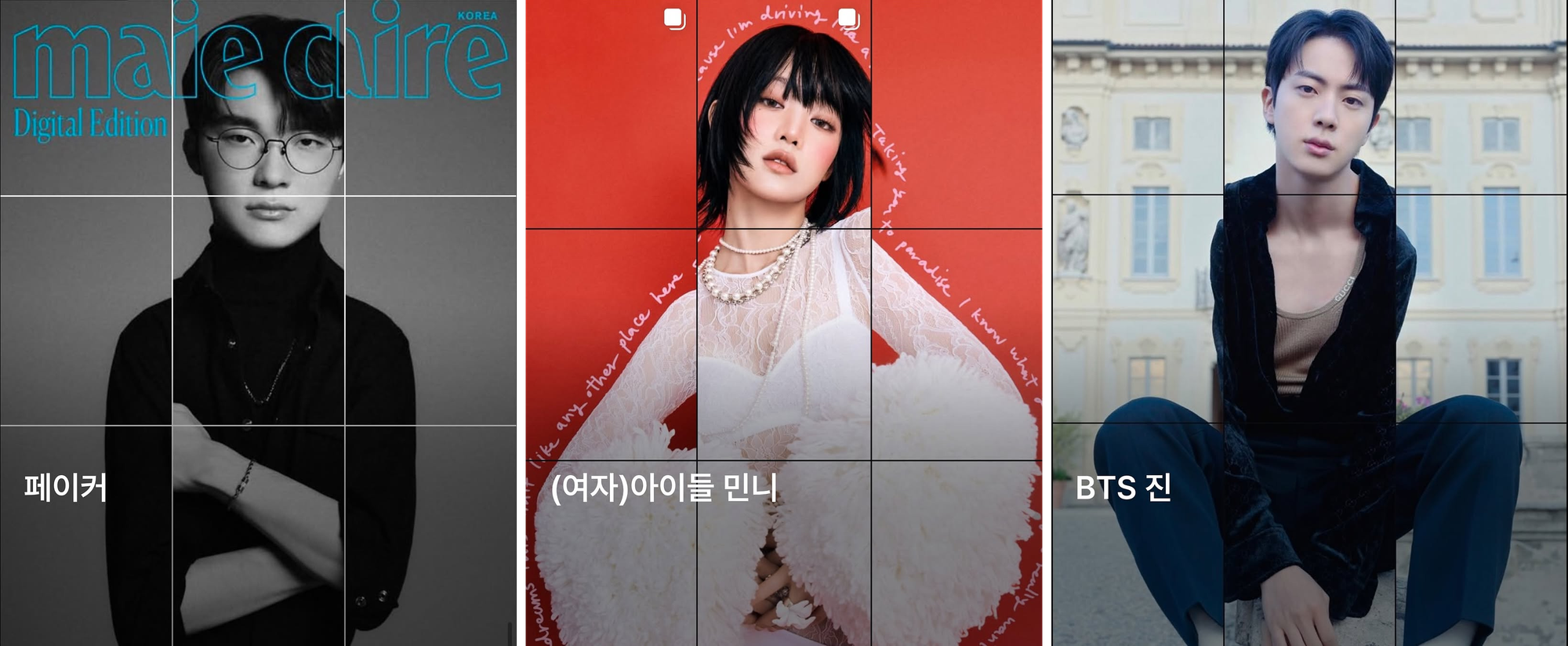
Even more shocking: even if you re-split it at 4:5 and re-upload, it still breaks!
Because of this, opinions online are split — some say 4:5, some say 3:4.
Unable to find a fix anywhere…
I stayed up all night testing it myself, and here's the real solution I found.
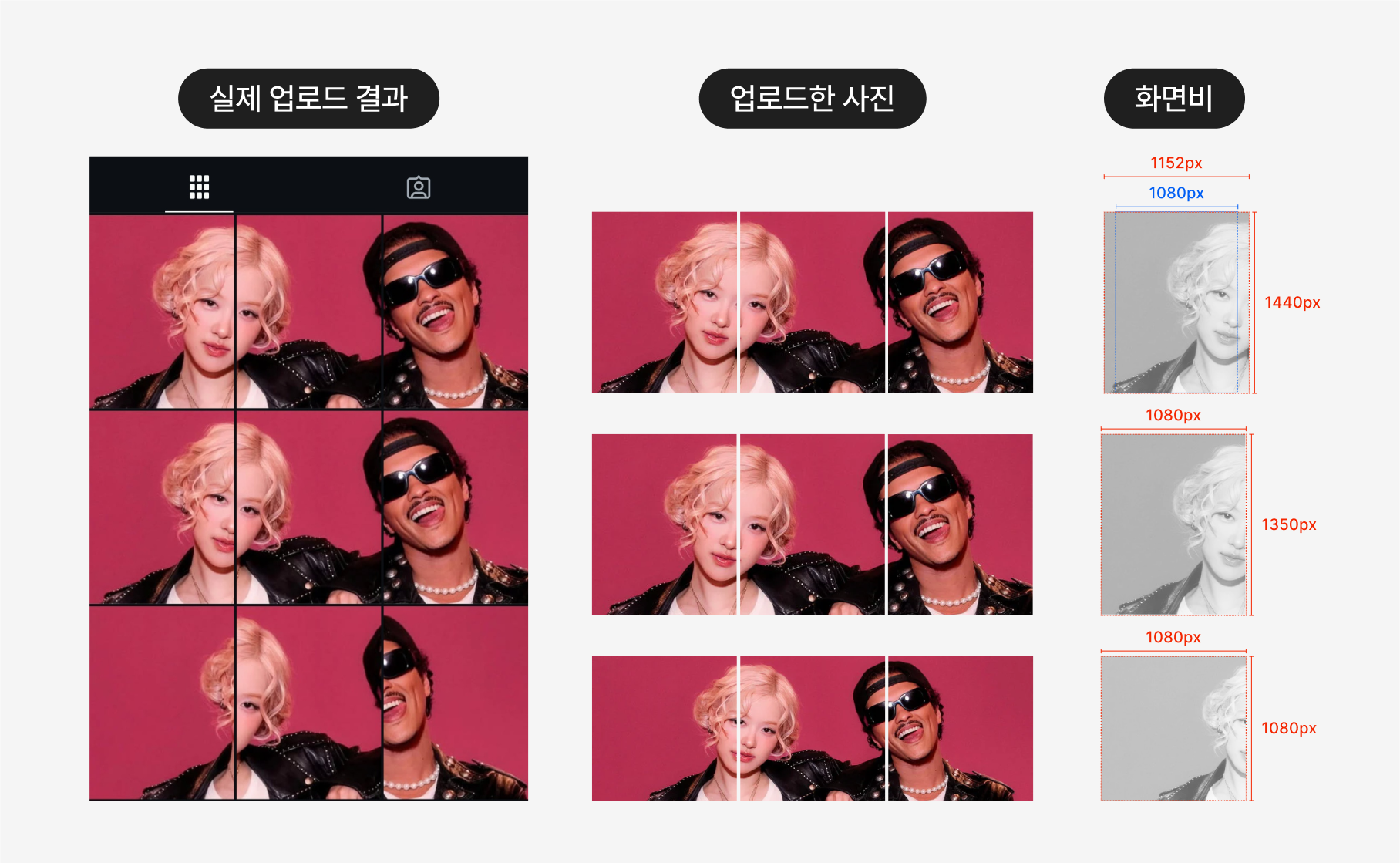
On Instagram, the maximum vertical ratio for upload is 4:5.
But, frustratingly… the thumbnail was updated to 3:4.
(cue designers grabbing their necks…)
1. First, split the photo to fit 1080 : 1440 (3:4).
2. Extend both sides by 36 pixels each to make it 1152 : 1440 (4:5) and upload — fixed!
Instagram managers, from now on don't suffer like I did when posting a split feed! 🥹
2. Instagram update fix 2: the perfect formula for no thumbnail cropping
The second type of damage is when the post thumbnail itself looks cropped.
Card news, ad images, all broke.
Even more shocking: on PC, the Instagram feed still shows at 1:1! 🙉
Since the thumbnail ratio differs between PC and mobile, designers suffer (again)…
Our Instagram was no exception! 😭 It's now fixed, as in the image below.
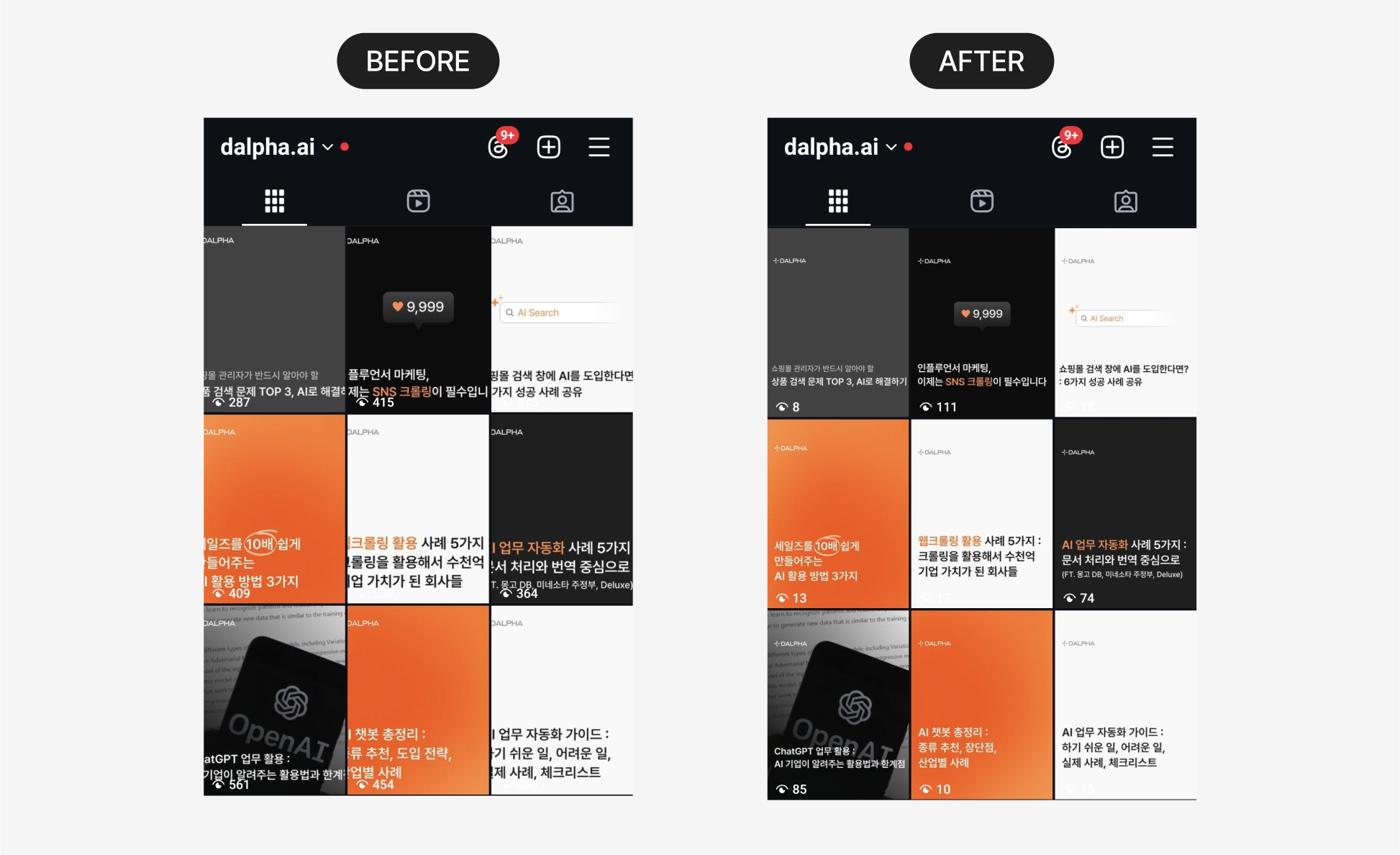
Here's the perfect formula for making an image with no problems anywhere — PC, mobile, or thumbnail.
Pay attention to the image and explanation below!
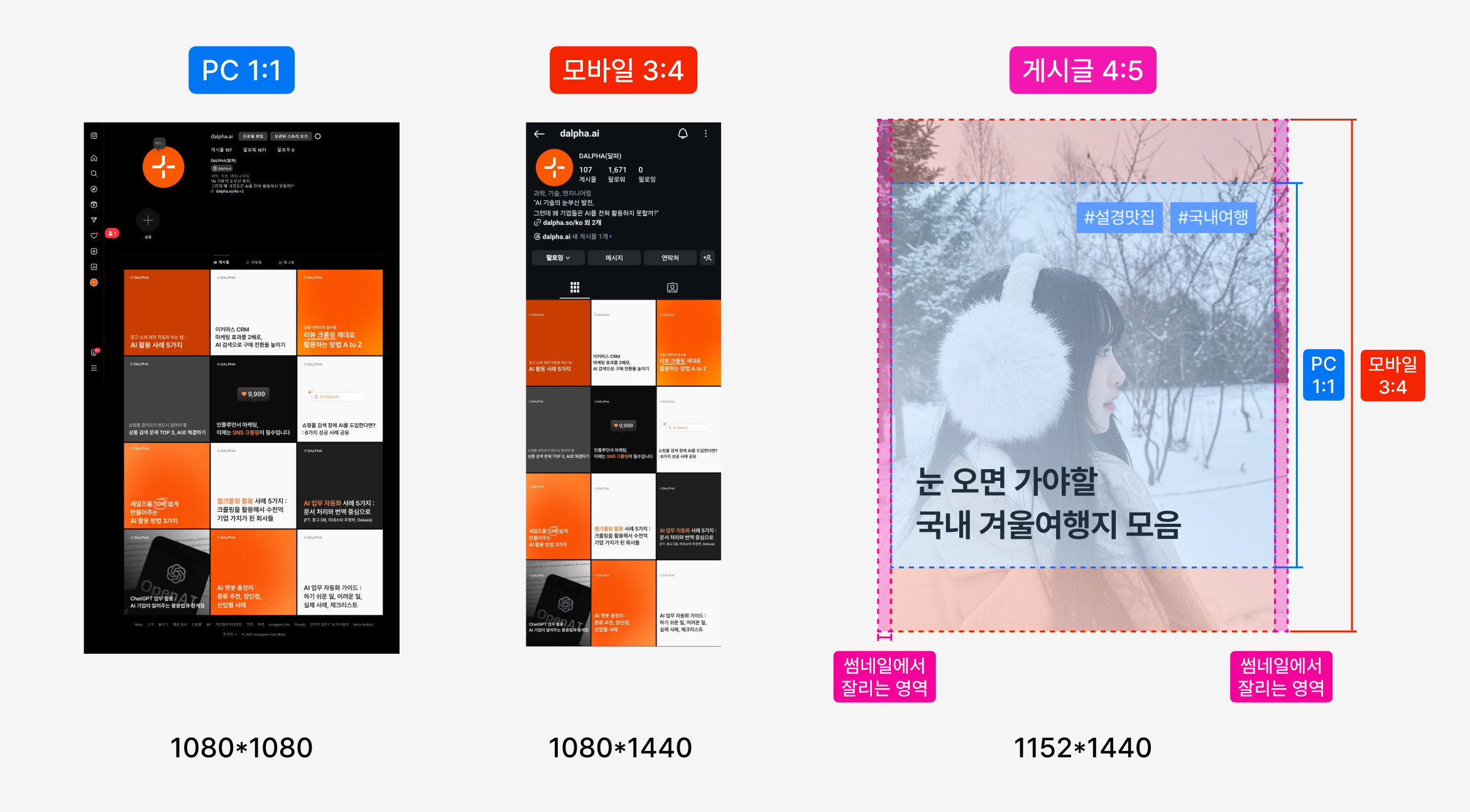
1. Design it to a 4:5 ratio, but make sure all the content fits within the square.
2. Leave a 3% margin on each side based on the horizontal length so it doesn't break in the 3:4 thumbnail either.
Just follow the formula above and you can make feed images with no problems anywhere — PC, mobile, or thumbnail!
After figuring out the thumbnail formula, I finished this task with AI in just 10 seconds.
The AI tool I used is 'AIMS'!
3. Various thumbnail images, fixed in 10 seconds with an AI tool — here's how
Below is a 10-second video of actually using the AI image auto-fixing tool 'AIMS'.
0:00
/0:13
1×
AIMS in actual use!
You can see the smart AI move individual design elements like text and images to
make the image the ratio you need, and even edit it afterward!With AIMS, not just Instagram thumbnails but site banner ads, Coupang main images, and more — you can edit images in one click to fit the requirements of various platforms.
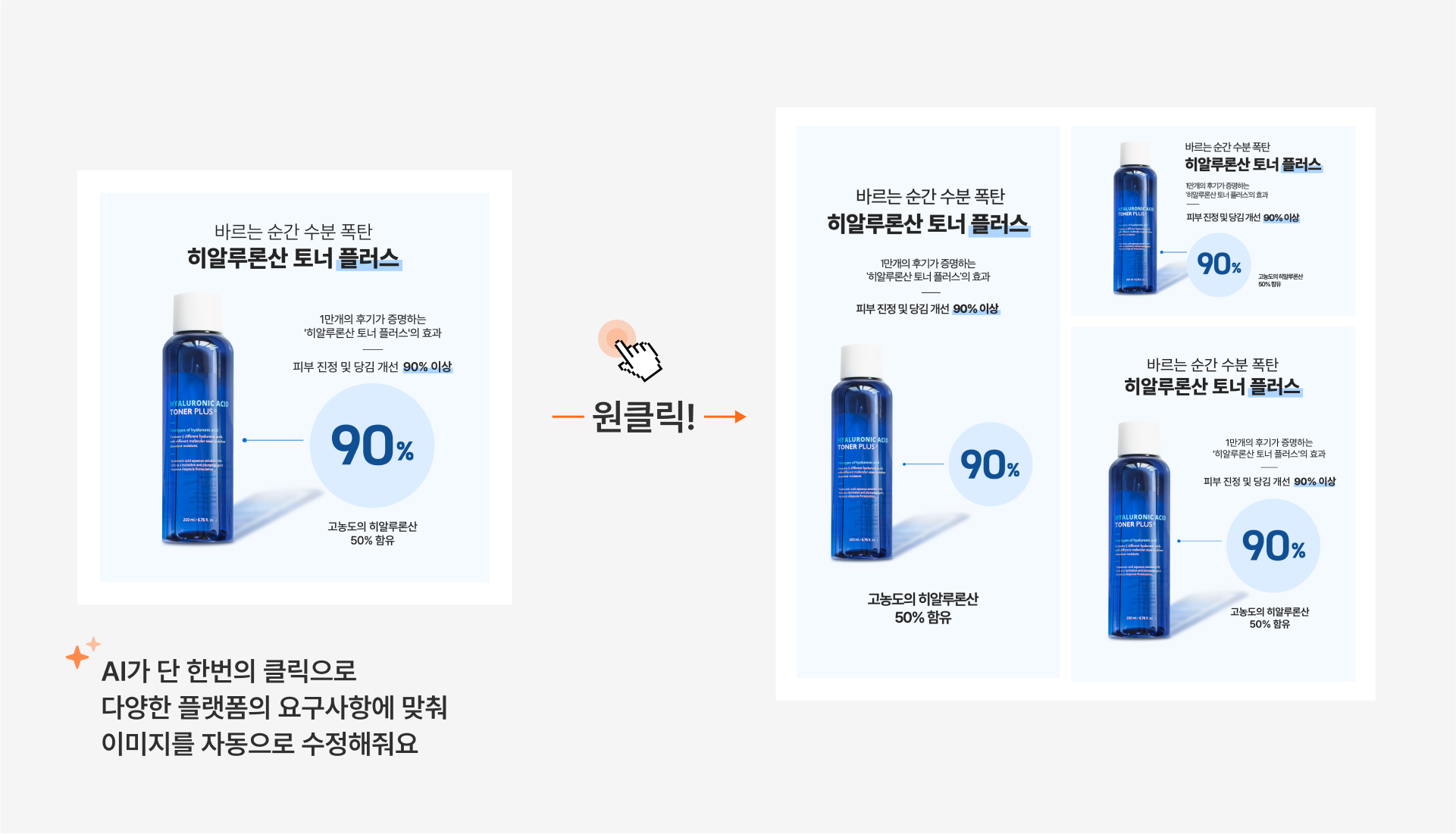
AIMS is an in-house tool Dalpha developed in collaboration with Lotte Daehong Communications!
Ad agencies actually use AIMS as a tool to efficiently automate ad-creative design.
You can also see cases used in advertising in the blog post below.

You can check AIMS's detailed features in the blog post below.
Practitioners interested in AIMS — via the 'Contact' button below, leave a quick inquiry and
Dalpha will check and reply to you quickly 📨
Inquire about the image-diversification AI solution
At Dalpha, through 1:1 consulting,
we plan and build AI solutions specialized for each company and product.
Free consultation — if you're interested, reach out anytime!
Serin Choi