A Complete 2025 Guide to LLM Models: Performance Comparison, Business Use Cases, and LLM Agents
In 2025, with large language models (LLMs) everywhere, which one is right for your work?
In this article, we show you how to apply LLMs to your work.
We also share what Dalpha's AI engineers found when they used and compared models firsthand across text (translation), image (OCR), and video (analysis and subtitle syncing) tasks—performance comparisons and the pros and cons of each model.
At the end, we also share examples of LLM Agents, the latest LLM trend.
1. What Is a Large Language Model (LLM)?
What is an LLM?
A large language model (LLM) is an AI (artificial intelligence) model that learns from vast amounts of data to understand human language and generate responses. For example, ask it to "write an apology email to a customer" and it whips up a natural draft, or ask it to "summarize the sales data" and it pulls out just the key points. It doesn't simply string words together—it understands context and intent, producing results you can put to work right away.
How it differs from older AI
Older AI required people to set rules manually or organize the data themselves. For example, to classify customer inquiries, you had to label each one with "positive" or "negative" tags.
LLMs, on the other hand, work through pattern learning. They analyze vast amounts of data—online articles, books, papers, social media—on their own, understanding the context and meaning of language without rules or labels. For instance, after seeing the sentence "I read a book every morning" repeatedly, it figures out on its own that "morning" often follows "every" and that "read" denotes an action. As a result, it naturally understands context and intent and acts on them.
LLM Features: Why Are They So Useful for Work?
How exactly do LLMs differ from older AI, making them useful for work? We've summarized the features of LLMs below.
"They make good use of our data"
Older AI required people to write rules or organize data in advance. To sort customer inquiries into "positive" and "negative," staff had to spend time applying tags. LLMs, by contrast, can leverage the data you already have (emails, reports, customer feedback). For example, upload your customer data to our solution, and it analyzes the main complaints so you can respond quickly.
"The results actually help your work"
Older AI only produced simple answers like "yes/no." When asked "Did the customer file a complaint?" it would just answer "yes" and stop there. LLMs, on the other hand, deliver results you can use directly in your work. Ask it to "write a response that reduces customer complaints," and it suggests natural wording that boosts customer satisfaction. You can also get results like market analysis reports or new product ideas, making it a big help for your business.
"It can be turned into a service quickly"
With older AI, turning something into a service meant developers had to write new rules or spend a long time preparing data. For example, building a customer-response system for a specific company could take weeks or months. LLMs, by contrast, build on pre-trained capabilities to quickly incorporate your company's data. They can learn a manufacturer's quality-report format to organize materials, or analyze a retailer's product data to automate classification—delivering solutions tailored to each industry's needs in a short time. With this speed and flexibility, you can quickly turn it into a service and put it to use.
2. Three Ways to Use LLMs at Work
Since the arrival of ChatGPT, LLMs and generative AI have come into full use in business. A great many companies are now working to apply generative AI to their businesses. As of 2024, more than half of global companies say they plan to use generative AI. Moreover, companies that adopted generative AI experienced an average revenue increase of 6–10%, with especially notable effects in marketing and customer service.
So how can you use LLMs at work? There are three main approaches. We'll introduce the advantages and limitations of each.
Basic LLM
This is the approach of simply using a publicly available large language model such as GPT or Gemini. It's mainly used at the individual practitioner level for tasks like data analysis, document writing, and summarization.
Advantages: Easily accessible to anyone, and quick to answer a wide range of questions.
Limitations: It's hard to reflect internal company data or work processes. There are also security concerns when handling sensitive data, and there are limits to scaling it across an entire organization.
General-purpose AI solutions
This is the approach of using LLM-based services—like AI chatbots, review analysis, and AI search—provided in SaaS form. It's mainly used at the company level to boost the efficiency of defined tasks such as customer support, marketing, and content creation.
Advantages: Can be adopted immediately without separate development, with low initial costs and maintenance burden.
Limitations: Because they're designed for many companies, it's hard to deeply reflect an individual company's data or industry-specific context. For an AI chatbot, for example, general answers to customer inquiries are possible, but responses tailored to a company's unique characteristics are difficult.
Custom AI solutions
This is the approach of using an LLM to build a dedicated AI system that reflects a company's internal data and workflows. It's used to automate tasks or boost efficiency for the needs of a specific domain or department. For example, it can learn a manufacturer's quality-control data or analyze a retailer's customer feedback.
Advantages: You can use your company's data in an optimized way, and you get custom analysis that reflects industry-specific characteristics. With expert help, you can build a competitive AI-based automation system.
Disadvantages: Initial development costs and adoption time are relatively high. Ongoing maintenance and data training are required.
As you can see, there are many ways for companies to use LLMs. You can start quickly with a basic model, or boost efficiency and gain easy access through a general-purpose AI solution. But to concretely solve a specific task, a custom approach is key.
For how to develop a custom AI solution, please refer to the article below.

3. Six Types of LLM Models
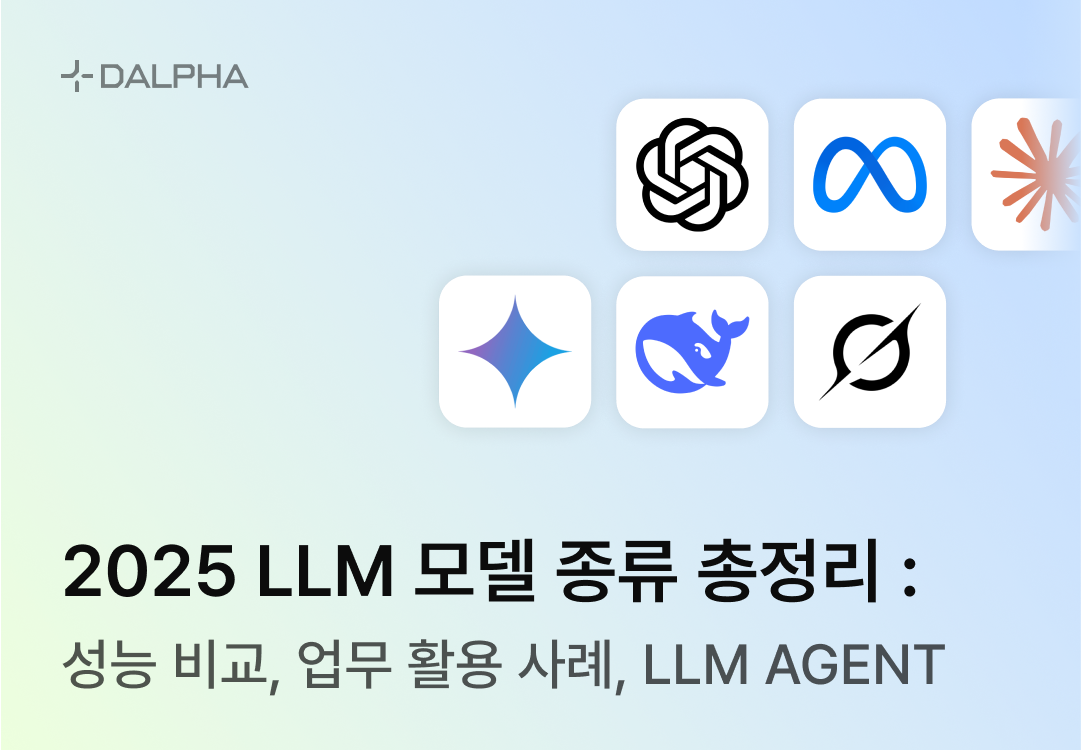
In 2025, large language models (LLMs) are competing, each showing off its own strengths and characteristics. We introduce six representative model types and summarize their features and advantages.
ChatGPT (OpenAI)
ChatGPT, developed by OpenAI, is the one that sparked the LLM craze. It's the flagship LLM that almost everyone has tried at least once. It's used widely across nearly every area—content creation, coding, customer service, and more. From creative writing to practical work support, it's a beloved model for its versatility.
Gemini (Google)
Gemini, unveiled by Google, was initially compared to GPT and relatively overlooked. But building on Google's existing technical strength, it has recently made significant performance improvements.
In particular, it shows excellent performance in multimodal tasks, especially image processing. For example, Gemini excels at looking at a product photo to write a description, or analyzing an ad image to extract insights. Built on Google's vast data and technical capabilities, it can be used when you want to hand over complex tasks that intertwine images and text.
Claude (Anthropic)
Claude, developed by Anthropic, has made a name for itself as a model specialized in coding. Created by former OpenAI researchers, its technical foundation is solid, and it's especially popular among developers. It shows outstanding performance in tasks like writing code, debugging, and organizing technical documentation. It has established itself as a trusted colleague you can rely on when solving complex programming problems.
LLaMA (Meta)
LLaMA, released by Meta, is a special model offered only as open source. Instead of commercial distribution, it's released so anyone can take and use it for free. Thanks to its open-source nature, it's freely customizable, so developers and researchers love using it to build their own AI. It's not easy for general users to access, but its great appeal is that it can be used in a tailored way.
DeepSeek (DeepSeek)
DeepSeek, developed by the Chinese startup DeepSeek AI, recently became a hot topic. That's because it released a model with remarkable performance at low cost. It shook the market enough to rattle NVIDIA's stock price. However, due to concerns about data leaking to China, its use has been blocked in many countries.
Grok (xAI)
Grok, released by xAI, reflects Elon Musk's philosophy and aims for unregulated conversation. Using Grok is simple: you can currently log in to X (formerly Twitter) and use it for free. A key feature is that it pulls X data in real time to provide responses that reflect the latest information. For example, you can instantly analyze social media trends or get answers based on the latest news. However, contrary to its mission of being unregulated and pursuing the truth, it has given biased answers to certain questions.
LLM models, each with different characteristics, are evolving in competition with one another.
So what's it like to apply these LLM models to your work?
4. LLM Model Performance Comparison
Each LLM model excels at different tasks. This is because each model differs in the amount and type of its training data, its training methods, the proprietary techniques each company keeps secret, and the markets and purposes it targets. For these reasons, each model develops its own unique strengths. As a result, performance differences become clearly apparent depending on the task and the model.
Based on what our engineers at Dalpha felt when they used them firsthand and thought, "Wow, this really is different!", we compared the latest 2025 models: GPT-4o, Gemini 2.0 Flash, and Claude 3.7 Sonnet. (API models only)
We excluded LLaMA, DeepSeek, and Grok, which are not yet widely adopted, because they have constraints or were released too recently.
We compared three tasks based on representative input types: text (translation), image (OCR), and video (video analysis and subtitle syncing).
Image (OCR)
Most AI-driven image tasks are related to OCR (optical character recognition). That's because it's the key to making scattered in-house information—paper documents, various PDF file formats, and more—usable. For details on how to use OCR at work, see the post below.
To compare OCR performance, we tested extracting information from a receipt.
Performance ranking: Gemini 2.0 Flash > GPT-4o > Claude 3.7 Sonnet
Evaluation criteria: With OCR, it's not just about reading the characters correctly—the real challenge is understanding context to extract meaningful data. For example, you need to distinguish values like "30,000 is an amount, 2025.03.25 is a date." Those numbers can only be used once you know what kind of information each represents—amount, date, product, and so on.
Original receipt image

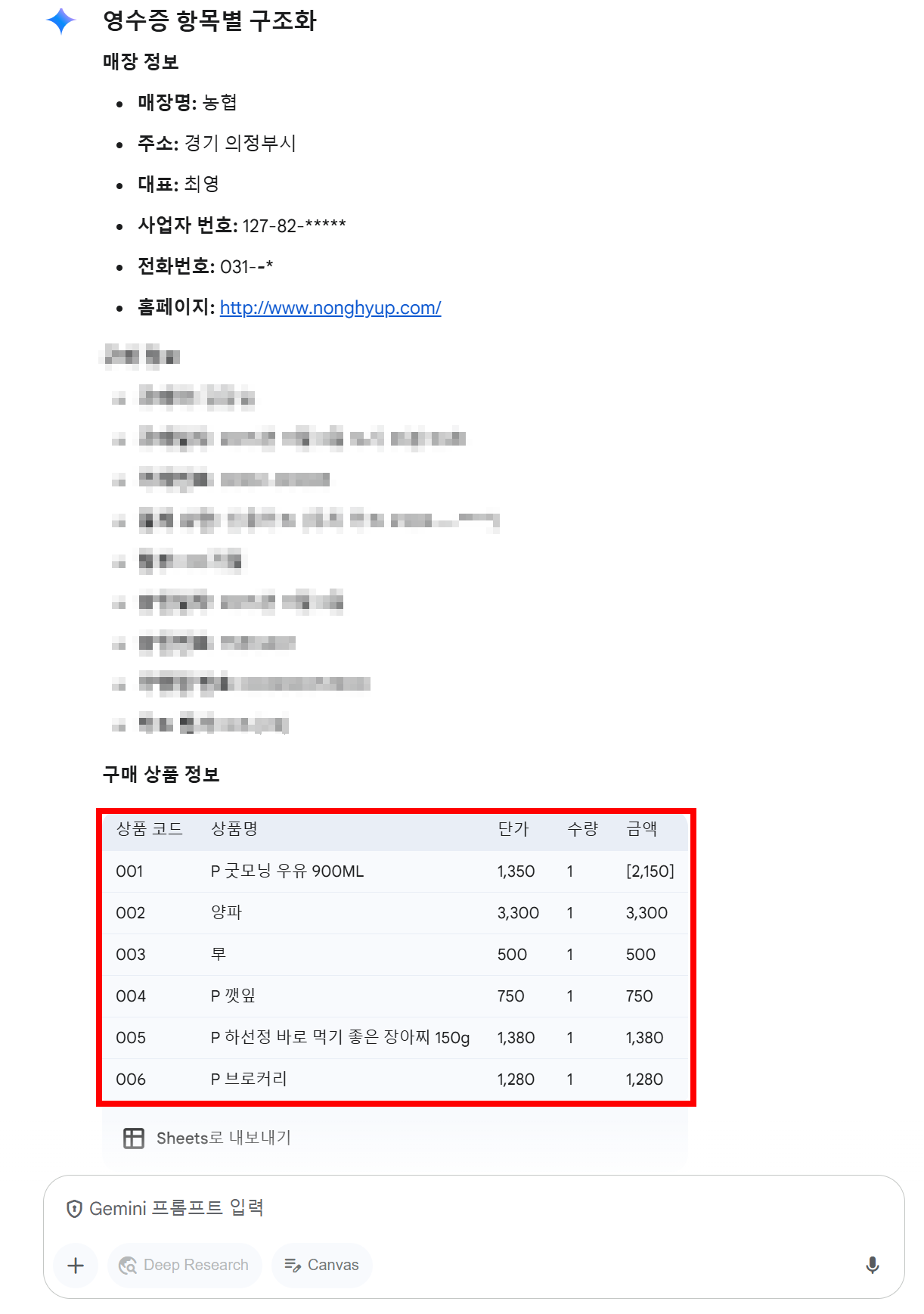
Gemini 2.0 Flash result
Claude 3.7 Sonnet, GPT-4o, GPT o1 results
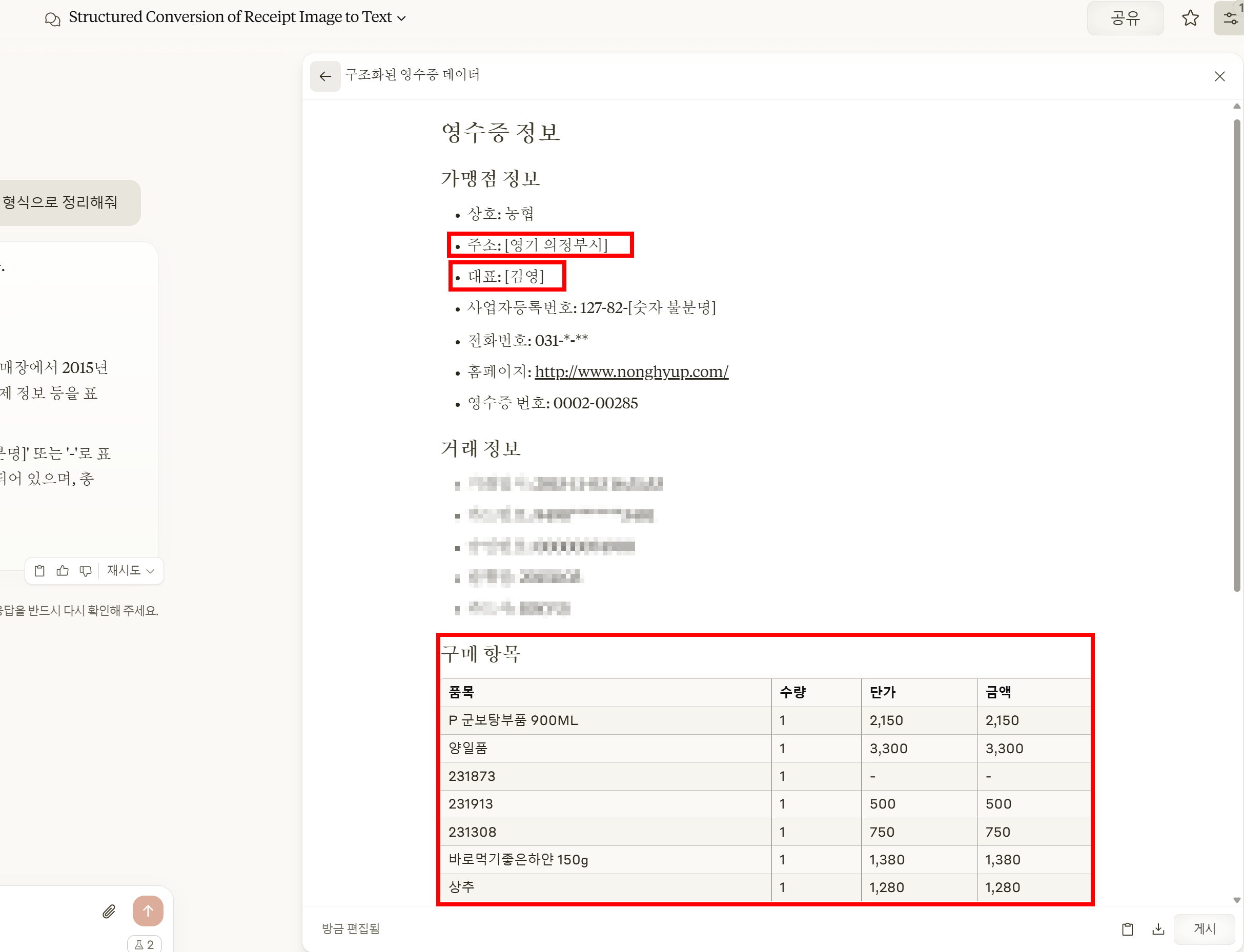
From left: Claude 3.7 Sonnet, GPT-4o, GPT o1
At Dalpha, we put in one receipt with the same prompt and compared OCR performance. We deliberately used a somewhat low-resolution image for the comparison. The result? Gemini 2.0 Flash was overwhelming. It read even blurry text well and was excellent at structuring and organizing the document information.
GPT-4o and Claude 3.7 Sonnet, by contrast, left much to be desired. First, there were errors in the address and the representative's name.
Crucially, the three models differed markedly in extracting the "purchased item" information. Aside from reading the item "radish" and getting confused over the milk amounts (1,350 won / 2,150 won), Gemini 2.0 Flash extracted the purchased-item information at good quality. GPT and Claude, on the other hand, made up product names that didn't exist or spat out item codes as-is. The results were practically unusable.
Gemini was also more convenient in terms of usability. You can feed in a PDF directly as input and process it, so there's no hassle. With GPT-4o or Claude, by contrast, you have to convert to PNG—and in that process, information was lost or it couldn't read multiple pages in sequence. Gemini was also faster, responding immediately to instructions like "just pull out the total." In many respects, Gemini showed the best performance for image-processing tasks.
Text (Translation)

Among text-based tasks, we want to compare translation, which accounts for a large share of the work. For example, imagine a situation where you need to translate the Korean subtitles of a variety show into English. We compared how outstanding each model's translation performance is for this task.
Performance ranking: Claude 3.7 Sonnet > GPT-4o > Gemini 2.0 Flash
Evaluation criteria:
The frequency of fatal mistranslations
The ability to handle Korean–English word-order differences naturally
The ability to translate appropriately for context
Example: The word '예' can be translated variously depending on the situation—'pardon?', 'what?', 'yes?', etc.
To evaluate translation performance, you need a standard for "what makes a good translation?" Dalpha's AI engineers considered the three criteria above to be the core of translation for this task. In our comparison, translation quality was best in the order Claude 3.7 Sonnet > GPT-4o > Gemini 2.0 Flash.
Let's take a clip from Infinite Challenge as an example.
The sentence "30 points is just my condition that day" came up.
Claude 3.7 Sonnet didn't miss the "30 points" and translated it as "Scoring 30 points."
GPT-4o and Gemini 2.0 Flash, by contrast, omitted "points" and just translated it as 30.
Beyond this—context-appropriate translation, mistranslation, and naturally handling Korean–English word order—Claude 3.7 Sonnet showed the best performance in these fine translation details.
<Note>
When comparing translations one sentence at a time, the quality may be similar.
But when comparing translation quality, the key is how well the entire video is handled.
That's because it reveals whether the model translates with good attention to context.
Video (Video Analysis and Subtitle Syncing)
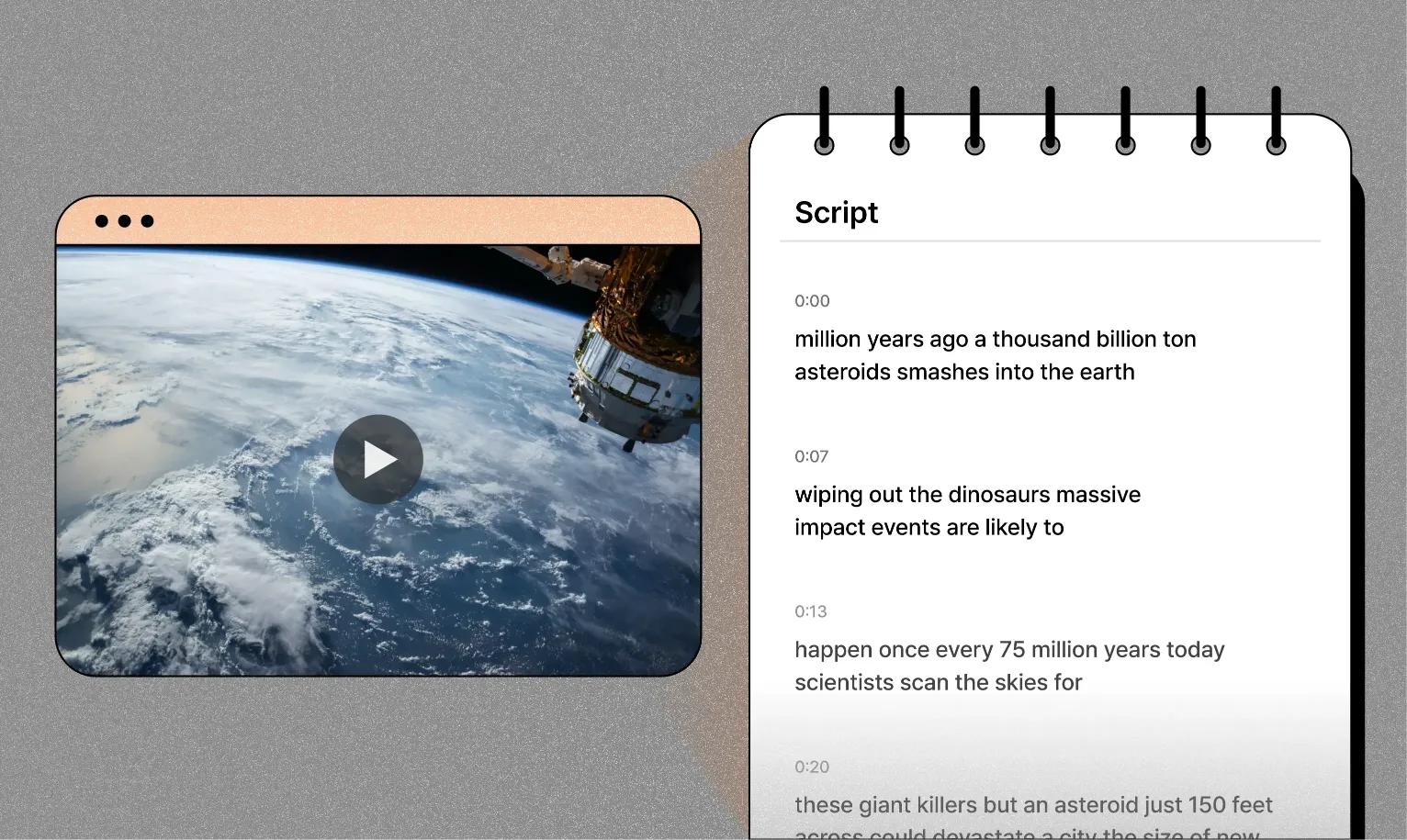
Video work is more varied than other tasks. That's because it often requires handling OCR, text (translation), and more all together. You can generate a description of the whole video, create subtitles via transcription, or translate subtitles. There are many such video tasks, and each has its own evaluation criteria. So designing the pipeline for the work the AI handles is important.
Beyond the fact that video work is varied, comparing LLM model performance for video tasks is difficult. That's because currently the only API model that can process video files is Gemini 2.0 Flash. (GPT-4o and Claude 3.7 Sonnet do not offer video input.)
So for video, we aim to compare the evaluation criteria for each of the various video tasks and the level of performance AI can currently deliver.
Performance comparison not possible: Only Gemini 2.0 Flash works
Evaluation by situation:
Speech transcription and subtitle generation: The "turn speech into subtitles" task was a bit disappointing. We tested it at Dalpha with ad videos, and it often missed pronunciations or the subtitles didn't match the speech, throwing off the sync. Timestamps were also frequently off.
Whole-video description: The performance was satisfying. When we fed in a 1–2 minute drama clip, it described the flow and structure in detail—"the protagonist and a friend are arguing, and the cause of the conflict is money." It was also useful when the marketing team analyzed ads.
Subtitle translation (Korean → Chinese): A client wanted to translate a video with Korean subtitles into Chinese. But the speech and subtitles were subtly out of sync, so we had to align consistency using SRT extraction and OCR. Gemini read the video and translated it, but it wasn't perfect due to the mismatch between speech and subtitles. For example, it translated "I like this" into Taiwanese Mandarin, but the actual speech was "I really like this," so it was slightly off.
Takeaway: Gemini is the only option for video processing, but subtitle syncing and translation still have room for improvement. Still, it definitely grasps the overall flow well, so it's usable for video summarization.
For video work, the trend is actually to use open-source models more than API-integrated models.
For video captioning, the InternVideo-family models—InternVideo2.5, VideoChat2, VideoChat-Flash—are mainly used,
and for video-audio captioning, video-SALMONN, CAT, and others are mainly used.
So far we've solved text, image, and video tasks with AI and evaluated and compared their performance.
Now, let's get down to business and show you how to find the LLM model best suited to solving your company's and your department's work problems.
5. A Guide to Choosing the Right LLM Model for Your Work
Here are some simple criteria for choosing the LLM model that fits your company's work environment and how to use it at work.
Criteria for choosing an LLM model
To adopt an LLM for your work, you first need to set criteria that fit your situation. Check these four things.
Task type: First decide what work you'll assign. If content generation (e.g., ad copy, report drafts) is the main goal, you need a model strong in text generation. But if your goal is analyzing long documents (e.g., reviewing contracts, summarizing customer feedback) or multimodal tasks like images and video, you should pick a model with a broad processing range.
Budget and scale: Cost and team size are also big variables. To reduce initial costs and test quickly, a free or inexpensive basic LLM or general-purpose solution is suitable. But for deep, long-term use, it's better to invest in a custom solution. For example, a small team might start with an affordable monthly SaaS subscription, while a large company might consider a dedicated system where reflecting data is essential.
Use of data: You also need to consider how much of your company's data you'll use. If you only need general answers (e.g., "tell me about market trends"), a basic model is enough, but if you want to dig deep into internal quality reports or customer data, you need a custom solution.
Speed and reliability: Speed requirements also matter. For real-time response (e.g., a customer chatbot), a fast and reliable model is essential. For batch processing like writing weekly reports, being relatively slow is fine. Still, for the sake of usability, you must always consider speed and reliability.
Criteria for choosing how to use it at work
Earlier we looked at how to use a basic LLM, a general-purpose solution, and a custom solution. Now we'll share criteria for choosing among them in practice.
When you only need simple output: Use a basic LLM like GPT or Gemini
It gives fast, simple text for requests like "summarize the sales data," but there's no deep analysis or automation. It's great for practitioners to use directly and simply.
When you need a certain level of completeness and a bit of automation: Use a general-purpose AI solution
With services like AI chatbots or document summarization, it can automatically answer customer inquiries or produce report drafts. It's hard to deeply reflect your company's characteristics, but you can boost efficiency with mid-level output.
When you need high completeness and work automation: Use a custom AI solution
By training it on your company's data, you can get in-depth output. It analyzes quality-control data and even writes reports automatically, or organizes marketing data to produce campaign proposals. The initial setup takes time, but it reduces repetitive work and can greatly boost efficiency.
6. LLM Agents: The Future of LLMs
So far we've looked at how well LLMs (large language models) are used for work and how to choose one. In 2025, LLMs have gone beyond simple tools to become powerful partners that boost business efficiency.
There's something emerging as a recent LLM trend: LLM Agents.
We'll wrap up by summarizing what an LLM Agent is, what examples exist, and its future potential.
What is an LLM Agent?
First, there's a broader concept above LLM Agents called AI Agents. It refers to smart systems that observe their environment and handle tasks on their own—for example, self-driving cars and robot vacuums are a kind of AI Agent.
An LLM Agent is an AI Agent based on an LLM (large language model) that autonomously carries out language-related tasks in particular.
For example, a regular LLM is a tool that writes a sentence when we say "write a customer email." But an LLM Agent can go one step further. Ask it to "organize customer complaints and write an email," and it can find and analyze the feedback containing complaints and even compose a tailored response. For instance, if a customer wrote "delivery is too slow," the LLM Agent can grasp the complaint and write an email on its own, like "We're sorry for the delay; we'll ship faster next time."
In other words, if an LLM is a "writing assistant," an LLM Agent is like a "secretary that handles the work for you." Just as we said in section 2 that custom solutions use data to streamline work, an LLM Agent solves it even more smartly and automatically.
LLM Agent examples
LLM Agents are already showing diverse potential in practice. Let's give a few examples.
Customer support: For a request like "analyze last month's customer complaints," it gathers and categorizes feedback and writes a report with improvement suggestions.
Marketing: Ask it to "create a campaign based on the latest trends," and it analyzes market data, suggests ad copy for each target, and even sets up a distribution plan.
Manufacturing: For a request like "check the production data," it finds anomalies, analyzes the causes, and proposes a maintenance schedule.
Content creation: For a request like "write a blog post," it automatically handles topic research, drafting, and even SEO keyword insertion.
The outlook for LLM Agents
As LLMs advance, LLM Agents are drawing attention as the next step. Going forward, they're expected to handle not just text but multimodal data like images and audio, and to take on even more complex tasks. The LLM Agents we're experimenting with at Dalpha have already moved beyond simple repetitive tasks and are gradually advancing toward project-management-level work. For example, ask it to "plan a new product launch," and it could do market research, set a schedule, and even assign team members' roles.
LLMs have had a big impact on practical work, but won't LLM Agents be the next step that takes it even further?
Want to improve your work environment with AI and LLMs?
We've summarized how to use LLMs at work, the types of LLM models, performance comparisons by model, and even LLM Agents, which will become the next big thing.
LLMs have now gone beyond simple tools, showing remarkable results across various tasks like text translation, image OCR, and video analysis. Going forward, they're evolving one step further into LLM Agents, opening up the possibility of revolutionizing work.
Want to apply LLMs to your work effectively? Consult with an expert.
We'll tell you which LLM model delivers the best performance for each type of work, what criteria to judge by, and how to continuously train and experiment.
At Dalpha, through one-on-one consulting,
we plan and build AI solutions optimized for each company.
Free consultationIf you're curious, reach out anytime!
Dalpha Blog