3 AI Solutions for Logistics and Product-Management Teams: Inbound/Outbound Documents, HS Code Tagging, and Product-Inspection Automation AI
Can the repetitive work of logistics and product-management teams be automated too?
Logistics and product-management teams are buried in the flood of documents and data they have to process every single day. From inbound/outbound management to handling client inquiries and recording defects, when most of it is done by hand, it's easy to miss the work that really matters.
✅ You open purchase orders and shipping instructions—each in a different format depending on the vendor—and enter the data into your ERP. Because they come as scans, images, PDFs, and all sorts of other formats, errors frequently occur during input.
✅ Sorting and recording hazardous items by opening returns and defective products one by one takes a long time. Managing everything by hand also leads to frequent data omissions and errors.
✅ In import/export work, looking up and entering the HS Code for each item one at a time takes hours. Misclassification can lead to customs delays or fines.
But because such tasks are highly repetitive and follow clear rules, there's plenty of room to automate them with AI.
Recently, many logistics and product-management teams have been solving these problems by adopting custom AI solutions.
This article introduces three custom AI solutions for logistics and product-management teams that companies have adopted to achieve real results, along with actual case studies.
3 AI Solutions for Logistics and Product-Management Teams
📄 Solution 1: Inbound/Outbound Document Automation AI
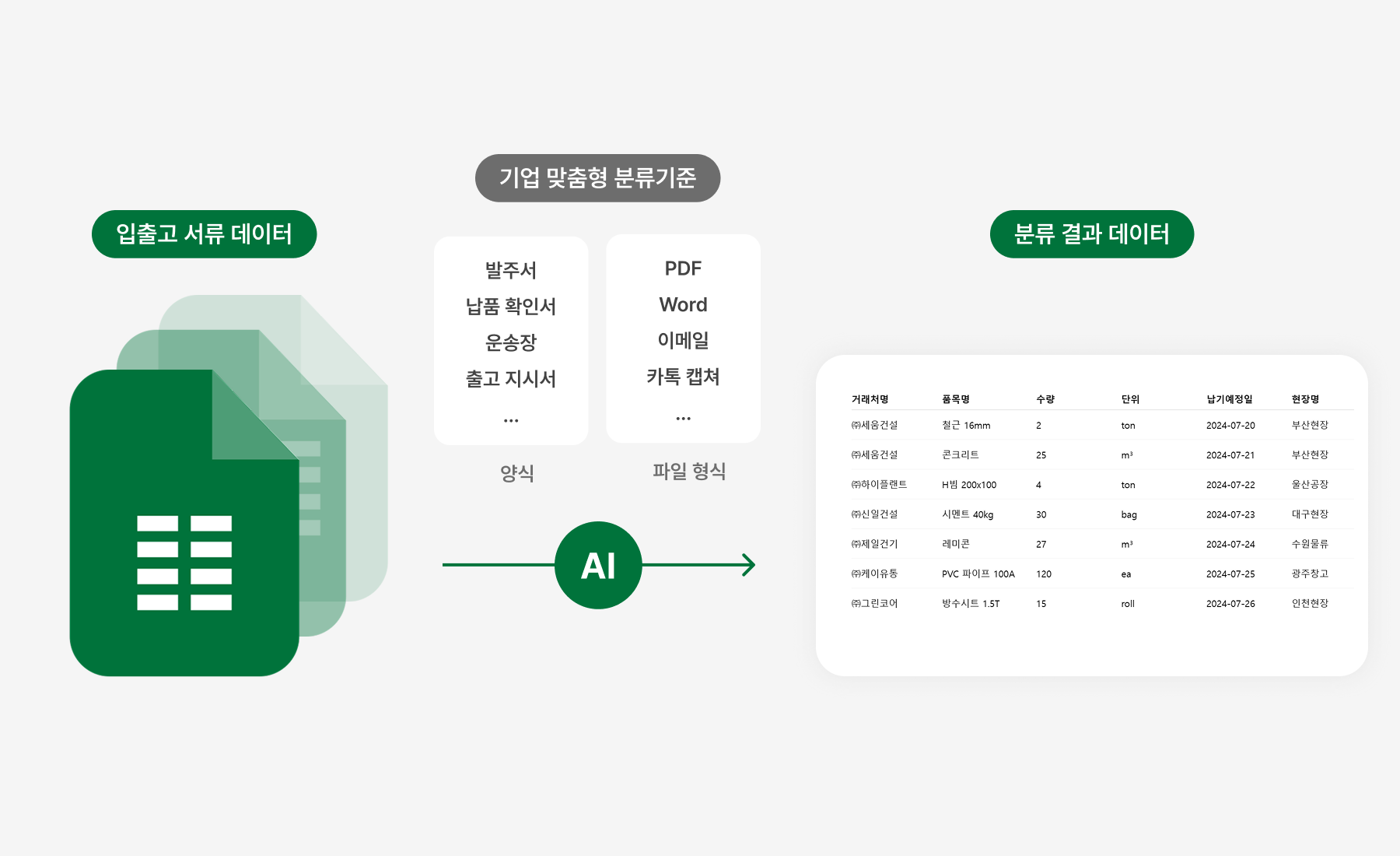
Are you still entering inbound/outbound documents by hand, one at a time?
Purchase orders, delivery confirmations, and waybills pour in every day. Since the formats and file types differ from vendor to vendor, the person in charge has no choice but to open dozens to hundreds of documents one by one and manually enter the needed data.
Inconsistent document formats: a mix of PDFs, Word files, images, email captures, and more
Mismatched formats and naming: item names, specs, and units differ by vendor, so they must be cross-checked against the internal database and entered manually
Risk of errors and omissions: typos, duplicates, and missing data throw off inventory and logistics data, and re-inspection is often required
Time drain and overtime: when volumes spike, input and organizing alone take hours, and overtime is common at month-end
Now, the inbound/outbound document AI handles it automatically
Just upload the document, and the AI analyzes the different formats and file types from each vendor on its own, then automatically refines and enters the needed information.
Automatic processing regardless of format: analyzes all documents at once—PDF, Word, HWP, images, email, and more
Automatic conversion of vendor-specific formats: organizes items like product names, specs, and quantities consistently according to your internal DB rules
Error prevention and highlighted review: the AI prevents input errors and omissions in advance, and highlights key items so review is easy
Major reduction in input and organizing time: freed from repetitive data entry, staff manage only review and exceptions
With a custom AI, you can also do this
- Learn each vendor's various document formats → provide auto-converted custom templates per company
- Link with internal DB rules → organize item names and field values consistently to improve inventory-management quality
- Support multilingual (Chinese/English/Japanese, etc.) documents → automatically process overseas vendor documents too
- Highlight key items → let staff verify quickly and without mistakes during review and approval
- Integrate with existing RPA systems → maximize overall efficiency through an automated, unified process
Real DALPHA Case 1: Order-Sheet Data Automation AI
Before
Y, a heavy-industry materials distributor, used to manually open order sheets that came in every conceivable format depending on the client (PDF, Word, images, messenger captures, etc.) and enter them one by one into its internal system.
Because the formats and terminology all differed, six staff members had to spend more than four hours a day on repetitive data entry and re-inspection, and overtime right before deadlines was common due to missed or mis-entered data.
After
Now, no matter the order-sheet format, just upload it and the key fields are automatically organized according to internal rules.
(1) The AI automatically learns each vendor's various document formats and converts them into a custom template per company,
(2) and by linking with internal DB rules, it standardizes data such as product names, specs, and units into a consistent format while preventing errors and omissions in advance.
(3) With highlighted key items and a review UI, staff just need to quickly check the draft and they're done.
Now the repetitive input and organizing work that six people once spent more than four hours on is finished by one person in just one to two hours, and manual workload dropped by over 80%. As a result, inventory-management quality and overall process efficiency improved dramatically.
Real DALPHA Case 2: Inbound/Outbound Inspection Report Data Auto-Refinement AI
Before
H, a logistics platform, used to manually enter hundreds of inbound/outbound inspection reports—each running 30 to 40 pages—into its own system every day.
Because the formats and writing styles differed by client, two staff members had to spend over half of each day finding and organizing the needed information, and repetitive tasks like image captures were no small burden either.
After
Now, even massive inspection reports just need to be uploaded, and the key fields and on-site images are automatically refined and extracted.
(1) With multilingual support and automatic recognition of various formats, it processes overseas vendor documents without a hitch,
(2) on-site images are automatically split out and saved as separate files, making them easy to use as inspection materials,
(3) and by linking with existing RPA and DBMS systems, the extracted data is loaded into the system in real time.
Work that two people once spent over half their day on is now done by one person doing only a morning draft review, and manual hours dropped by over 65%. As a result, the entire process is much faster, and errors have been greatly reduced.
🌐 Solution 2: HS Code Tagging Automation AI

Are you still looking up and entering HS Codes yourself?
Import/export staff have to check dozens to hundreds of item descriptions every day, looking up and entering HS Codes by hand.
Complex item descriptions: classification is hard from keywords alone, so you have to dig up past records and similar cases one by one
Manual research and input: it takes a long time because you have to compare and search against databases, then enter the codes manually
Risk of errors and omissions: a mistaken or missing code can cause risks like customs delays and fines
Repetitive paperwork: you also need to separately prepare Excel files and declaration forms for submission to customs and other agencies
Now, the HS Code Tagging AI handles it automatically
The AI analyzes item descriptions and specs all at once, handling everything from accurate HS Code recommendations to auto-generating declaration drafts.
Context- and history-based recommendations: even complex descriptions are accurately classified by referencing actual declaration history, classification criteria, and similar cases
Automatic entry and document generation: based on the recommended code, it automatically generates Excel files and declaration drafts for customs submission
Real-time error detection and alerts: missing entries and anomalies are compared against past data and flagged immediately
Higher accuracy through repeated learning: as staff reviews and feedback accumulate, the AI handles new items even more accurately
With a custom AI, you can also do this
- Integrate with internal systems → automatically map HS Codes by linking with existing item codes in ERP, PLM, and the like
- Reflect country-specific regulations → automatically apply code classification by importing/exporting country, including FTA and preferential tariff rates
- Learn from history and similar cases → reflect past import/export data and staff patterns to provide practical, real-world recommendations
- Customize input formats and rules → automatically classify codes to match each company's item names and input methods
- Highlighted review UI → enable fast, accurate verification with key fields automatically marked
- Integrate with various systems → automatically refine data and generate documents in real time with ERP, customs, Sabangnet, and more
Real DALPHA Case 1: HS Code Tagging Automation and Order-Info Translation AI
Before
E, a logistics platform, processed tens of thousands of new orders every day through a Japanese open market.
Staff had to manually translate orderers' names and addresses from Japanese into English, and they also had to convert product names—often mixed in with ad copy—into English names suitable for export declarations and enter them.
HS Code tagging likewise required repeatedly cross-checking the existing DB multiple times or defining new codes and reviewing them over and over, leading to a constant stream of translation errors, missing codes, and wasted time.
After
Now, orderer information and product names are automatically converted into English, and the English names for export declarations and the HS Codes are auto-tagged all at once.
(1) By linking with the internal system, product names already registered in the existing DB are instantly matched, while new products are automatically defined and updated in real time.
(2) By customizing input formats and rules, even product names mixed with marketing keywords are converted consistently to match the export format.
(3) With a highlighted review UI, staff can see the key fields and results at a glance, greatly reducing review time and the risk of errors.
Now staff only need to quickly check the results, and the labor and time once spent on manual translation and DB searches dropped by over 70%. Even when new items come in, the DB is automatically kept up to date, so they can respond immediately.
Real DALPHA Case 2: HS Code Auto-Recommendation AI on Product-Name Entry
Before
When K, a global distribution company, exported products to various countries such as the US and Japan, staff had to search the customs portal or past records every time to look up the right HS Code for each product name one by one.
The longer or more ambiguous the product name, the more frequent the classification errors and the slower the work—a problem that kept recurring.
After
Now, just enter the product name and the most appropriate 10-digit HS Code is automatically recommended.
(1) It even reflects country-specific regulations, classifying codes by country—including FTA and preferential tariff rates—all at once,
(2) and the AI learns from past import/export history and staff work patterns to provide practical, field-experience-based recommendations.
(3) Linked with various systems, data is automatically refined in real time with ERP, customs, Sabangnet, and the like, and the generated codes can be used right away in import/export documents.
Now, without complex code searches or research, staff can simply enter a product name to check the HS Code easily and quickly, freeing them to focus on their work without the burden of errors and repetitive tasks.
🛠️ Solution 3: Product Inspection and Defect Detection AI
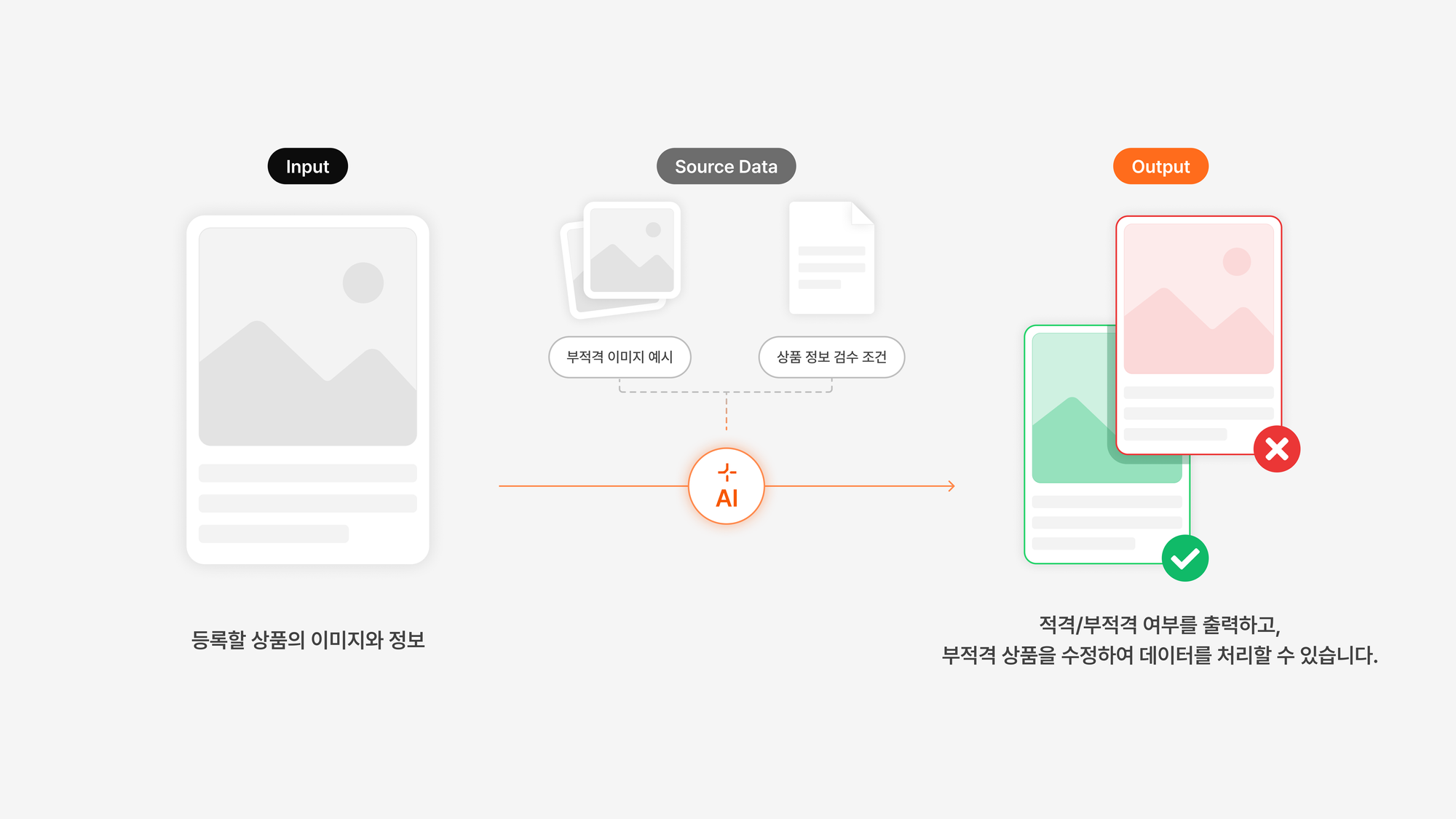
Are you still handling product inspection and defect detection by hand, one at a time?
Quality-control staff in online commerce spend a lot of time every day on repetitive manual work—inspecting, recording, and reporting returns and defective products.
Manual defect-type identification: checking product images directly and identifying defect types like scratches and stains one by one
Manual recording of defect data: hand-recording and organizing details such as when defects occurred, the product type, and the responsible department
Manual analysis/report writing: organizing data such as defect rates by process and variances by partner to write reports by hand
Manual management of repeat improvement requests and warning alerts: separately issuing improvement-request forms and warning alerts when defect types recur
Now, the AI handles product inspection and defect detection automatically too
Just upload a photo, and the AI analyzes the image and data to automate everything from defect-type identification to reporting and alerts. Staff can check the AI's results all at once and focus solely on decision-making.
Automated image-based defect identification: the AI analyzes uploaded product images to automatically identify defect types like scratches, damage, and stains, along with their severity
Automatic organization and entry of defect data: automatically organizes data by when defects occurred, product type, and responsible department, and enters it directly into quality systems like ERP/QMS
Automatic generation of analysis reports: automatically generates various analysis reports such as defect rates by process and quality variances by partner
Automatic sending of improvement requests and warning alerts: when defect types recur or thresholds are exceeded, automatically sends improvement-request forms and warning alerts
With a custom AI, you can also do this
- Apply custom input formats → use the formats you already use, such as product images and defect-record templates (PDF, Excel, in-house tools, etc.)
- Learn defect criteria individually → automatically classify according to each client's defect-judgment rules (e.g., scratches 3cm or longer)
- Analyze various input data → analyze diverse data together, such as return-reason text, intake notes, and call records
- Integrate with internal quality systems → automatically log to ERP, QMS, WMS, etc., and immediately send warning alerts when defect rates are exceeded
- Provide visual highlights → emphasize defect types and key points so inspectors can verify quickly and accurately
Real DALPHA Case 1: New Product Registration Inspection Automation AI
Before
E, a fashion platform, receives more than 35,000 new product registration requests every month. Previously, the product inspection team processed approvals/rejections one by one according to inspection guidelines (text and image criteria).
But because the volume was so high, the MDs in charge had no choice in practice but to approve quickly by hand or process based only on simple keywords or categories.
During inspection, it was hard to thoroughly check every criterion—brand-name mis-registration, category errors, duplicate registrations, inappropriate image use, and more—so the practical burden kept growing due to mistaken approvals, unnecessary rejections, and repeated inquiries and re-registrations.
After
Now, new product inspection no longer requires a person to examine each one.
After adopting Dalpha's product-inspection automation AI, the AI automatically analyzes various information—product names, brands, categories, images, and more—according to E's complex inspection guidelines.
(1) Regardless of the input format, it automatically collects and organizes product names, brands, categories, and images, integrating 100% with the quality-management system,
(2) and the AI individually learns and applies even detailed inspection criteria such as brand-name mis-registration, use of flowery language, and category errors, automatically providing approval/rejection results and detailed reasons.
(3) Approval/rejection reasons and key points are provided as visual highlights, so staff can verify inspection results quickly and accurately at a glance.
Now, without worrying about mistakes from repetitive inspection, unnecessary re-reviews, or staff overload, even a small team can quickly and accurately manage more than 35,000 products a month in bulk.
Real DALPHA Case 2: Hazardous-Product Inspection Automation AI (Commerce Company S Case)
Before
S, a commerce company, is a large commerce platform where countless products are registered and distributed, making the inspection of hazardous products (safety-standard violations, banned items, etc.) an important quality-control task.
Previously, staff had to inspect each item by hand, cross-checking the hazardous-product list against text criteria only (product names, brand names, etc.).
But due to similar names, typos, altered product names, and image forgery or manipulation, actual hazardous products were often missed, or excessive false positives caused inspection time and staffing to balloon.
After
Now, hazardous-product inspection no longer requires staring at Excel sheets or lists.
After adopting Dalpha's hazardous-product inspection AI, staff just enter the hazardous-product document number, and based on that image the AI pulls out high-similarity candidates from a database of millions of products all at once.
(1) It analyzes various input data—images, text, and more—all at once to quickly extract similar candidates,
(2) and it automatically integrates with the quality system, so staff only need to make a final check of whether items on the list are actually hazardous.
Now, without worrying about recurring false positives, omissions, or excessive manual work, hazardous products can be inspected faster and more accurately, greatly improving real on-the-ground efficiency and quality-control levels.
✨ Now logistics and product-management teams can focus on their core work
So far, we've looked at three cases of solving the typical repetitive tasks faced by logistics and product-management teams with AI solutions.
When logistics and product-management teams break free from simple, repetitive work, on-the-ground efficiency and the company's overall competitiveness rise together.
Wondering whether your company's work could be automated with AI too?
Click the button below and tell us about the work situation or challenges you're currently facing.
Based on similar field cases and data, we'll propose the most suitable solution directly for you.
Inquire about AI solutions for logistics and product-management teams
Dalpha Blog